Software-defined storage (SDS) gives you more choice over the hardware that holds your backups. You can select capacity and performance to suit your workloads, then expand the repository as retention needs grow. That flexibility is useful when a fixed appliance configuration no longer fits your budget or recovery requirements.
The choice still needs to work on the day you restore. This guide compares the benefits and operational costs of SDS as a backup target, with Catalogic vStor as an example of a software-defined repository for DPX.
What Is Software-Defined Storage?

SDS separates the software that manages storage from a specific hardware appliance. You choose compatible servers and disks according to the product’s requirements. Deployment options and supported storage protocols vary by platform.
An SDS backup target stores the data written by your backup software. Some products provide distributed storage across a cluster; others manage storage on individual servers. Check how the proposed system expands and handles failures rather than assuming every SDS product uses the same architecture.
Benefits of SDS for Backup Storage
Hardware Choice and Capacity Planning
Choosing hardware separately from storage software lets you match spending to the backup workload. A repository for recent recovery points may need faster disks than a target holding older copies. Reusing suitable equipment can also reduce the initial purchase, provided it meets the vendor’s performance and support requirements.
Growth depends on the platform. Adding disks, expanding a pool or deploying another repository are different operations, with different limits and maintenance requirements. Ask how backup jobs will use new capacity and whether expansion requires moving existing data.
Potential Savings over the Retention Period
SDS can reduce dependence on a vendor’s appliance hardware. Compare that benefit against the full cost of servers, software licensing, support, power and administration. Include the spare capacity needed while hardware is replaced or data is migrated.
Consumption-based pricing is a commercial option offered by some vendors. Buying SDS does not establish a particular billing model or guarantee that you pay only for occupied capacity. Compare quotes using the same protected data volume and retention assumptions.
Protection Features You Can Configure
Depending on the product, an SDS repository can provide snapshots, encryption and replication to a second location. These features serve different purposes. Encryption protects confidentiality, snapshots preserve recovery points, and a separately managed copy supports recovery after a site failure.
Immutability requires the appropriate locks and retention settings. Confirm which data is protected, who can remove a lock and how long protection lasts. A copy on the same repository still depends on that repository’s availability.
Storage Efficiency and Recovery Access
Compression and deduplication can reduce the capacity needed for retained backups. The result depends on the data and the resources allocated to the repository. Already compressed or largely unique data offers less opportunity for reduction.
Restore speed depends on the complete path from backup storage to the recovered workload. Check repository read performance and network capacity, then time a representative restore. A feature list cannot establish whether the system meets your recovery time objective (RTO).
Trade-offs to Plan For
| Area | What SDS can offer | What to verify |
|---|---|---|
| Hardware | Choice of compatible servers and storage | Support requirements, replacement parts and failure handling |
| Expansion | Capacity added according to the platform’s design | Pool limits, job placement and any migration downtime |
| Cost | Alternatives to fixed appliance configurations | Licensing, support and operating costs over the retention period |
| Security | Configurable protection for recovery copies | Lock modes, permissions and recovery after a compromise |
| Performance | Storage sized for the backup workload | Backup throughput and measured restore time |
Setup and Maintenance
Your team owns the work of configuring storage and maintaining its host. Plan for updates, failed disks and capacity alerts. Validate the supported connection between the backup application and repository before deployment.
SDS can run on physical servers or within a VM. A virtual deployment needs reserved resources and a plan for recovering the repository if its host becomes unavailable. Software overhead and resource contention should be assessed for the chosen deployment, not attributed to every SDS system as a virtualization penalty.
Resource Requirements
Data reduction has a cost in CPU and memory. In vStor, the ZFS deduplication settings include controls for deduplication-table memory use; the documentation warns about memory exhaustion in resource-constrained systems. Test with your own backup data before committing to a reduction ratio or hardware size.
Software Dependence and Recovery Procedures
Hardware choice reduces dependence on a particular appliance model, but the backup format and management software still matter. Check how you would recover if the original repository or backup catalog were lost. Keep configuration backups and required encryption keys accessible to the recovery team.
Protect the repository’s management interface with restricted access and suitable authentication. Define who can change retention settings and how those actions are monitored.
How Catalogic vStor Fits
Catalogic vStor is a software-defined backup repository for DPX. The deployment documentation covers physical appliances and virtual appliances on VMware or Microsoft Hyper-V. DPX deployments can use multiple vStor appliances; hardware sizing depends on backup volume and retention, along with the resources required by the selected features.
Immutability and Encryption
vStor provides snapshot and volume protection controls. Flexible Protection permits lock changes or removal using multifactor authentication (MFA). Fixed Protection cannot be lifted before its retention period expires. Volume deletion locks protect against deleting a volume; they should not be described as making every file on an active volume unchangeable.
Volume encryption is enabled when the volume is created. Include key storage and access in the recovery plan so encrypted backups remain usable after a system failure.
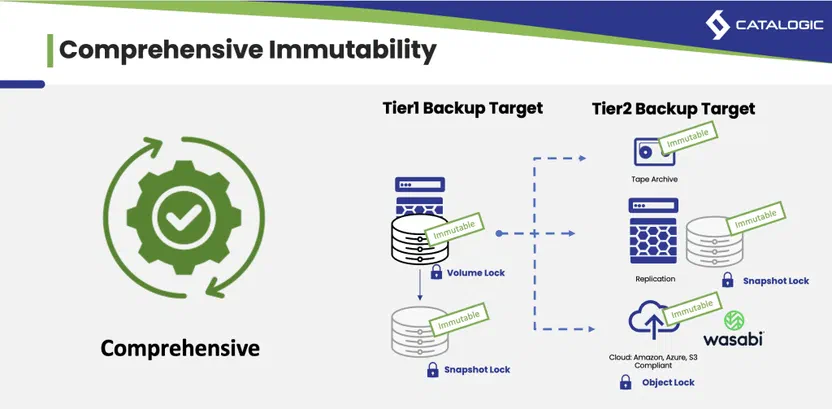
The diagram illustrates protection options that require configuration. Snapshot locks differ from volume deletion locks. Tape immutability requires suitable protection such as LTO write-once, read-many (WORM) media; cloud copies need the provider’s retention controls, such as S3 Object Lock. These protections do not apply automatically to every destination.
Recovery and Ransomware Checks
vStor Snapshot Explorer mounts compatible backup disk images so you can browse and recover individual files. Supported disk-image and filesystem requirements apply.
GuardMode Scan in vStor checks mounted filesystems for suspicious files or signs of encryption before recovery. Automatic scanning can be enabled for newly created filesystem snapshots. Separately, the GuardMode Agent monitors filesystem activity on protected systems for anomalies before backup. These checks help assess recovery points and complement endpoint protection.
The vStor management interface provides configuration and recovery workflows. Optional telemetry collects anonymous usage data for Catalogic; it serves a different purpose from monitoring your repository’s capacity or recovery readiness. See the vStor system settings.
For a product overview, read the vStor software backup appliance resource.
Choosing a Repository for Your Workload
Before selecting SDS, compare it with an appliance configuration using the same retention period and recovery targets. Ask your team or supplier to demonstrate:
- A restore that meets your RTO, including a full workload recovery where needed.
- Capacity growth without exceeding the platform’s limits or disrupting required backup jobs.
- Recovery after the original repository becomes unavailable, using the retained configuration and keys.
- Protection of recovery points when production credentials are compromised.
- The full cost of running and supporting the repository over its expected life.
Conclusion
SDS is a practical choice when control over hardware and capacity growth matters to your backup plan. Its value depends on selecting a supported configuration and proving that the recovery workflow meets your requirements. Budget for the work your team will own, and test the oldest backup you expect to retain as well as the most recent one.
Talk to us about vStor or request a vStor demo to compare repository options for your environment.