NDMP Backup in 2026: The Protocol Isn’t the Problem. Your Management Layer Is.

There’s a narrative floating around that NDMP is dead. That it’s a legacy protocol clinging to relevance while modern API-based approaches have moved on. Right? And I get the appeal of that story. It’s clean. It’s simple. But if you’re actually running a large NAS estate in production, you know it’s not that straightforward.

NDMP backup still protects the majority of enterprise NAS data. Not because people haven’t heard of the alternatives, but because ripping out a backup protocol that’s wired into your filer infrastructure is a project nobody wants to fund when the current approach works. The real pain, for most teams we talk to, isn’t the protocol itself. It’s everything around it: the legacy GUIs, the CLI-only configuration, the two-console shuffle just to troubleshoot a single failed job.

So the question worth asking isn’t “NDMP or not?” It’s: does your NAS backup problem actually require a protocol change, or does it need an operational upgrade?

NDMP Is Still the Default for a Reason

NDMP was purpose-built for NAS. It moves data directly from filer to backup target without routing through a media server, which keeps backup traffic off your production LAN. For NetApp ONTAP, Dell PowerScale (Isilon), and other enterprise filers, the NDMP integration is mature and well-tested. The storage vendors themselves support and maintain it.

We’ve been working with NDMP for over 25 years at Catalogic. We’ve seen the cycles: from on-prem to cloud, then back to on-prem for some workloads, from tape to disk to object storage. Through all of that, NDMP has remained the most widely supported protocol for NAS data protection. NetBackup, Commvault, IBM Storage Protect, HPE Data Protector, Arcserve: they all rely on it as their primary mechanism for backing up filers. Commvault’s documentation, updated as recently as January 2026, still treats NDMP as a first-class citizen.

Organizations running 50 TB to multi-petabyte NAS environments don’t switch protocols on a whim. The filer-side services are proven. The backup catalogs are built. The recovery runbooks are written. That’s a lot of operational capital.

The Real Limitations (and the Ones That Get Exaggerated)

Now, NDMP does have genuine weaknesses that matter more today than they did ten years ago. Let’s be specific about what those are.

Throughput on High-File-Count Volumes

NDMP was designed around single-stream backups per volume. For a 500 GB volume, that’s fine. For a 20 TB volume packed with millions of small files, it becomes a bottleneck. The NAS spends most of the backup window scanning metadata rather than transmitting data. Community reports from NetApp and Dell consistently describe throughput dropping to 10 MB/s in these scenarios. At that rate, backing up 10 TB can stretch into weeks.

Some implementations support parallel streams (up to eight in certain configurations), but parallelism within NDMP is implementation-specific and often limited by the filer’s own service capacity.

The Incremental Cycle

Traditional NDMP implementations use a level 0 through level 9 cycle, which means a full backup after every nine incrementals. Without a reliable changed-file-tracking mechanism at the filer level, the backup application has no efficient way to identify what changed. That forces periodic full rescans. On large volumes, that means periodic multi-day backup windows.

No Standard Data Format

NDMP doesn’t specify a data format for backup streams. Data backed up from a NetApp filer can’t necessarily be restored to a Dell PowerScale. If your DR strategy assumes cross-platform recovery, this is a real constraint.

These are legitimate limitations. But here’s what’s important: they don’t hit every environment equally. If your volumes are in the single-digit terabyte range, your file counts aren’t in the tens of millions, and your recovery targets are same-platform, NDMP performs just fine. The protocol isn’t the bottleneck. Something else is.

What Actually Hurts Day to Day

Here’s what gets lost in the protocol debate. For most organizations, the daily pain of NAS backup has nothing to do with how data moves off the filer. It’s everything around it.

Think about what managing NDMP backups actually looks like in many environments. A Java-based console that hasn’t been meaningfully updated in over a decade, pinned to a specific JRE version that conflicts with everything else on the admin workstation. CLI-only configuration for anything beyond basic job setup, which means tribal knowledge locked in the heads of two or three senior people. Separate tools for backup management versus storage management, so troubleshooting a single failed job means switching between consoles and correlating timestamps manually. Monitoring that amounts to parsing email alerts or scraping log files because the backup software doesn’t expose metrics through any modern interface.

This overhead is real and measurable. And it’s often more expensive in engineer-hours than any throughput limitation. A backup job that completes reliably and can be configured, monitored, and troubleshot from a single browser-based interface by any member of the ops team is a better outcome than a theoretically faster job that only two people in the organization know how to manage.

A Decision Framework: Protocol Change or Operational Upgrade?

Not every NAS backup problem requires a protocol migration. Here’s a practical way to evaluate which camp you’re in.

You probably need a different approach to data movement if your NAS volumes routinely exceed 10 TB with tens of millions of files and backup windows are consistently blown; your DR plan requires cross-platform restore (NetApp to PowerScale, or to cloud-native storage); or you’re already running modern filer firmware with vendor API support and can take advantage of snapshot-based change tracking.

You probably need an operational upgrade if NDMP throughput is adequate for your volumes and SLAs but managing jobs is painful; your team spends more time fighting the console than fixing actual backup failures; you’re running filer platforms where NDMP is the best-supported integration; or you want unified backup management across NAS, VMs, databases, and cloud workloads without migrating your entire infrastructure.

For teams in the second camp (and that’s most of the enterprises we work with), the priority should be finding a management layer that wraps NDMP with something modern while keeping the protocol doing what it does well.

What Modernizing NDMP Backup Actually Looks Like

This is where I want to get specific, because “modernization” is one of those words that means everything and nothing.

Replace the legacy console with a browser-based interface and a REST API. DPX ships with an HTML5 web application alongside the legacy desktop client, and exposes full management capability through a REST API. The web interface requires no JRE, no installer, just a browser. It covers job management, scheduling, node configuration, tape library management, and reporting, including RPO compliance and unprotected-node detection. The REST API gives operations and automation teams programmatic access to the same functions, making DPX scriptable and integration-ready without screen scraping or proprietary tooling. The combined result: any ops team member can manage NAS backup jobs from a browser, and any automation pipeline can do the same without a human in the loop.

Consolidate NAS backup alongside everything else. One of the most common complaints we hear is tool sprawl: one console for NAS, another for VMware, another for physical servers, maybe a fourth for cloud. DPX manages NDMP backup for NetApp and Isilon alongside Hyper-V, VMware, physical file servers, and S3 workloads from a single dashboard. That’s not a convenience feature. It’s the difference between an ops team that can cross-train and one where NAS backup is a single point of knowledge failure.

Keep file-level restore working. This matters more than people think. NDMP dump-style backups in DPX maintain a full file catalog, so recovery means searching for and restoring individual files or folders. Not restoring an entire volume and fishing through it. Not telling the requester “we’ll need to do a full volume restore, it’ll take 48 hours.” That file-level granularity is often the reason NDMP is still preferred over snapshot-only approaches for operational recovery scenarios.

Support the filers you actually have. DPX supports generic NDMP (which covers a wide range of vendor devices) plus NetApp-specific extensions like CAB (Cluster Aware Backup) and SMTape. Whether you’re on ONTAP 7-mode, clustered Data ONTAP, or PowerScale, the integration works with the filer firmware you’re running today. Not just the latest release.

Make the economics work. This is a practical concern that doesn’t get enough attention in technical blog posts. If you’re protecting 20 TB of NAS data, the licensing cost of your backup software shouldn’t require a board-level conversation. DPX is licensed to make NDMP backup economically viable as a standalone use case, not just as an add-on to a six-figure enterprise agreement.

When NDMP Really Isn’t Enough

I want to be direct about this: there are environments where NDMP is the wrong answer. If you’re dealing with volumes in the hundreds of terabytes with file counts in the hundreds of millions, and your backup windows are measured in weeks instead of hours, the single-stream architecture of NDMP will hold you back regardless of how good the management layer is. API-based approaches that use vendor-native change tracking and parallel data reads are genuinely better for those workloads.

Similarly, if cross-platform restore is a hard requirement (say, recovering NetApp data onto cloud-native storage as part of a DR scenario), NDMP’s lack of a standard data format is a blocking issue, not an inconvenience.

The point isn’t that NDMP is always the right choice. It’s that for a large segment of enterprise NAS environments, the protocol is fine and the management experience is what needs fixing.

Key Takeaways

  • NDMP remains the most widely supported NAS backup protocol in enterprise environments. The “NDMP is dead” narrative is vendor marketing, not operational reality.
  • The protocol’s real limitations (throughput on high-file-count volumes, periodic full backups, no standard data format) matter at extreme scale, but don’t affect every environment equally. Be honest about whether they affect yours.
  • Most NAS backup pain comes from operational friction: legacy consoles, CLI dependency, tool sprawl, poor observability. An operational upgrade often delivers more value than a protocol migration.
  • Modernizing NDMP means a browser-based UI, consolidated multi-workload management, file-level restore with a searchable catalog, broad filer support, and economics that make sense for NAS-focused deployments.
  • Before starting a protocol migration project, ask whether the problem is actually how data moves off the filer, or how your team manages and monitors that process day to day.
Read More
04/10/2026 0 Comments

DPX 4.15: Modern NDMP Backup Management, VMware Tags, and Enterprise Encryption

DPX 4.15 is shipping with four areas of meaningful change: full NDMP management in the web interface, VMware backup scoping by vCenter tags, KMIP-compliant key management in vStor, and cloud archive encryption. None of these are speculative features. They deliver on capabilities that our customers have been asking for, and each one has a clear operational payoff.

This post walks through what each feature does, why it matters operationally, and where it fits in the broader context of how organizations manage NAS, VMware, and encryption today.

NDMP Management Moves to the Web Interface

If you manage NDMP backup jobs in DPX, this one is for you. Until now, NDMP configuration and operations lived in the Java desktop client while VMware, Hyper-V, and block backup jobs had already moved to the web interface. With DPX 4.15, NDMP joins them: node management, backup job configuration, restore operations, and monitoring are all available in the browser.

The goal is full parity with the Java GUI for NDMP workflows, which means organizations running NDMP backups for NetApp or Isilon NAS environments can consolidate onto a single management tool.

To appreciate why this matters, some context on NDMP is useful. NDMP is a protocol that dates back to the mid-1990s, co-developed by NetApp and Intelliguard to solve the problem of backing up NAS appliances that could not run third-party backup agents. The protocol separates the control path from the data path, allowing backup software to orchestrate jobs while the NAS appliance handles the actual data movement. It remains the standard approach for protecting NAS data on platforms like NetApp ONTAP and Dell Isilon.

The industry conversation around NDMP has evolved over the past several years. Vendors like Veeam have introduced changed-file-tracking approaches for NAS backup that bypass NDMP entirely. Rubrik and Cohesity have built their NAS protection around incremental-forever models. Veritas introduced Dynamic NAS (DNAS) as an alternative to pure NDMP workflows.

These approaches have merit in certain environments. But the reality is that many organizations continue to rely on NDMP, and for good reason. They have NetApp filers, Isilon clusters, or other NAS infrastructure where NDMP is the supported, tested, and operationally understood method. Replacing it involves requalifying restore procedures, retraining staff, and often re-architecting backup data flows. For those environments, investing in better NDMP tooling delivers more immediate value than migrating to a different backup paradigm.

Moving NDMP management into a browser-based interface reduces the number of tools administrators need to maintain, lowers the barrier for onboarding new team members, and opens the door to API-driven automation. If your team currently scripts against the Java client or CLI for NDMP workflows, it is worth exploring what equivalent automation paths the web interface and its APIs provide.

VMware Backup Scoping by vCenter Tags

DPX 4.15 adds the ability to define VMware backup jobs using vCenter tags as the selection criteria. When a new VM is created and tagged in vCenter, it automatically falls into the scope of the corresponding backup job. When a tag is removed, the VM drops out.

This is a welcome addition for VMware-heavy environments. Previously, VMware backup jobs in DPX were defined by selecting specific VMs, resource pools, or folders. That approach is straightforward, but in environments where VM provisioning is frequent (dev/test, CI/CD pipelines, dynamic workloads), it means someone needs to update backup job definitions as VMs are added, moved, or reorganized. Tag-based scoping removes that overhead entirely.

Tag-based backup scoping is an established pattern in the market. Veeam supports tag-based VM selection with individual tags and tag combinations. Commvault supports filtering by tags, tag categories, custom attributes, and other vCenter metadata fields. DPX 4.15 brings this capability to our customers, and for organizations already using vCenter tags to organize their infrastructure (by department, SLA tier, application criticality, or compliance scope), backup job definitions can now align directly with those existing categories.

A few things to keep in mind. First, this works with vCenter tags specifically. If your VMware environment is managed through standalone ESXi hosts without vCenter, tags are not available. Second, the operational benefit depends on having a disciplined tagging practice in vCenter. If tags are inconsistently applied, backup coverage gaps will follow. Third, it is worth confirming how DPX handles edge cases: what happens when a VM has multiple tags that match different backup jobs? What happens during a vCenter outage when tag resolution may fail? These are the kinds of questions your VMware administrators will ask during rollout planning.

The net result is less manual maintenance of backup job definitions and better alignment between how your VMware team organizes infrastructure and how your backup team protects it.

KMIP Key Management in vStor

DPX 4.15 introduces support for KMIP-compliant keystores in vStor, the software-defined storage appliance that serves as the primary backup repository for most DPX deployments.

KMIP (Key Management Interoperability Protocol) is an OASIS standard that defines how encryption keys are managed across systems. It allows organizations to centralize key lifecycle management: generation, rotation, revocation, and destruction of keys through a single key management server, regardless of which systems consume those keys. Major KMS platforms like Thales CipherTrust, HashiCorp Vault Enterprise, and Utimaco ESKM all support KMIP.

The practical significance here is separation of duties. Until now, encryption keys for vStor were managed locally, which is simple and works well for many environments. But organizations operating under compliance frameworks like SOC 2, HIPAA, PCI DSS, or NIST 800-171 often need encryption key management to be separated from the systems that store encrypted data. KMIP support in vStor makes that possible.

With KMIP support, vStor can now act as a KMIP client, retrieving and using encryption keys from an external key management server. This means the backup administrator manages backups, and the security team manages keys. Audit trails for key usage live in the KMS, not in the backup system. If a key needs to be rotated or revoked, that happens centrally without touching individual vStor nodes.

DPX 4.15 also supports migrating keys between keystore backends. This means organizations can move from a local keystore to a KMIP-compliant external KMS (or between KMS platforms) without re-encrypting all existing backup data. For teams that are adopting centralized key management incrementally, this is a significant convenience.

Key management configuration is available through both the vStor UI and CLI, which matters for environments where security configuration is managed through automation or infrastructure-as-code pipelines.

When planning your deployment, check which KMIP versions vStor supports and confirm compatibility with your specific KMS platform. KMIP is a standard, but testing against your exact configuration is always worthwhile. The DPX compatibility matrix has the details.

Cloud Archive Encryption

Alongside KMIP support, DPX 4.15 adds encryption for cloud archive jobs. Data is encrypted before it leaves the DPX environment, regardless of the cloud or S3-compatible target.

This is client-side encryption, which is distinct from transport-layer encryption (TLS) that protects data in transit, and from server-side encryption that some cloud providers apply at the storage layer. Client-side encryption means the data is encrypted by DPX before it is transmitted. The cloud target never sees unencrypted data. DPX handles both encryption on the way out and decryption on the way back during restore.

This matters because it gives the backup team control over encryption regardless of what the cloud target supports natively. Whether you are archiving to AWS S3, Azure Blob, a MinIO cluster, or another S3-compatible endpoint, the encryption is consistent and managed by DPX.

For organizations with data sovereignty requirements, this is particularly relevant. Client-side encryption ensures that even if a cloud provider is compelled to provide access to stored data, the data is encrypted with keys that the provider does not hold (especially when combined with the KMIP integration described above, where keys live in your own KMS).

vStor and Operational Improvements

Beyond the headline features, DPX 4.15 includes several vStor enhancements worth noting.

Image mounting in vStor now runs as a background task with progress reporting per disk, so administrators can continue working while mounts complete. In environments where mounted images are used for granular file recovery or testing, this is a quality-of-life improvement that adds up over time.

Direct raw file restore from mounted images to SMB shares is now supported without requiring ZIP packaging as an intermediate step. This simplifies recovery workflows, especially for end users or application teams who need specific files restored to a share they can access directly.

Per-volume deletion lock policies provide finer-grained retention control. Instead of applying a single retention rule across all volumes on a vStor node, administrators can now set different deletion lock policies on individual volumes. This is useful in environments where different backup workloads have different retention requirements, for example, keeping production database backups for 90 days while retaining compliance archives for seven years.

Aggregated event notifications can now be delivered as PDF attachments. For teams that rely on email-based operational reviews rather than logging into the DPX interface, this reduces the need to check the UI for routine status updates.

The Bigger Picture: Web UI Consolidation

DPX 4.15 continues the web UI consolidation that has been a priority since DPX 4.11. Each release brings more workflows into the modern interface: DPX 4.14 brought tape library management, and DPX 4.15 adds NDMP. The trajectory is deliberate, and we are getting close to the point where most organizations can standardize entirely on the web interface.

If NDMP was the last major workflow keeping your team on the Java client, DPX 4.15 is likely the release where you can move away from it. Check against your specific operational procedures, but that is the milestone we aimed for with this version.

Wrapping Up

DPX 4.15 is an execution release. It delivers on things our customers have asked for: NDMP management in the web interface, VMware backup scoping that aligns with how teams actually organize infrastructure, and enterprise encryption controls that satisfy compliance requirements out of the box.

The value is practical. A single management interface for all backup workflows. Less manual maintenance of job definitions. Better alignment with enterprise key management practices. Encryption that the backup team controls end to end.

If you are running DPX in production, the upgrade conversation should focus on three things: whether your NDMP workflows are fully supported in the new web interface, whether your vCenter tagging practices are mature enough to take advantage of tag-based backup scoping, and whether your security team has a KMIP-compliant KMS ready for the encryption integration.

Those are concrete, answerable questions. That is what makes this a useful release.


Paweł Staniec is CTO at Catalogic Software.

Read More
04/09/2026 0 Comments

GuardMode verstehen: Verbesserter Ransomware-Schutz für Backups im Jahr 2025

Ransomware-Angriffe werden im Durchschnitt erst nach 7 bis 8 Tagen erkannt – und bis dahin könnten Ihre Backup-Dateien bereits kompromittiert sein. GuardMode von Catalogic ändert das, indem es Ihre Daten vor dem Backup überwacht, Bedrohungen frühzeitig erkennt und dabei hilft, nur die betroffenen Dateien wiederherzustellen, anstatt ganze Systeme zurückzusetzen. 

Wenn Sie Backup-Administrator oder IT-Fachkraft mit Verantwortung für Datensicherheit sind, zeigt Ihnen dieser Beitrag, wie GuardMode funktioniert, welche Funktionen es bietet und wie es sich in Ihre bestehende Backup-Strategie integrieren lässt. In rund 10 Minuten erfahren Sie mehr über Erkennungsmethoden, Wiederherstellungsoptionen und praktische Vorteile. 

Die aktuelle Herausforderung beim Ransomware-Schutz für Backups 

Die Erkennung dauert zu lange

Die meisten Organisationen merken erst zu spät, dass sie Ziel eines Ransomware-Angriffs geworden sind. Studien zeigen, dass es im Jahr 2025 im Durchschnitt 7 bis 8 Tage dauert, bis eine aktive Infektion erkannt wird. In dieser Zeit kann sich die Schadsoftware im gesamten Netzwerk ausbreiten, Dateien verschlüsseln und unter Umständen Daten kompromittieren, die in regulären Backup-Zyklen enthalten sind. 

Diese Verzögerung entsteht, weil herkömmliche Sicherheitswerkzeuge darauf fokussiert sind, Angriffe an Eintrittspunkten wie E-Mails oder Webbrowsern zu verhindern. Sobald Ransomware diese Schutzmaßnahmen umgeht, kann sie unbemerkt im Hintergrund agieren und nach und nach Dateien verschlüsseln, ohne sofortige Warnungen auszulösen. 

Sicherheits- und Backup-Teams arbeiten isoliert

Zwischen den Tools des Security-Teams und der Backup-Infrastruktur besteht oft eine Trennung. Endpoint-Lösungen wie Antivirensoftware und Firewalls sind darauf ausgelegt, Bedrohungen vom Netzwerk fernzuhalten. Sie überwachen jedoch nicht explizit, was mit den Daten passiert, die von Backup-Systemen geschützt werden sollen. 

Backup-Software hingegen konzentriert sich auf das verlässliche Kopieren und Speichern von Daten, analysiert jedoch in der Regel nicht, ob diese Daten kompromittiert wurden. Dies schafft eine Sicherheitslücke, bei der infizierte Dateien gemeinsam mit sauberen Daten gesichert werden und so die Wiederherstellungsmöglichkeiten verunreinigt werden. 

Ransomware zielt auf Backup-Dateien

Moderne Ransomware ist so ausgereift, dass sie gezielt Backup-Dateien und -Systeme angreift. Angreifer wissen, dass Organisationen auf Backups zur Wiederherstellung angewiesen sind, und verschlüsseln daher gezielt Backup-Repositories, Schattenkopien und Wiederherstellungspunkte. 

Wenn Ransomware Ihre Backup-Dateien erreicht, entfällt Ihre wichtigste Wiederherstellungsoption. Selbst wenn Sie den Angriff schnell erkennen, könnten Ihre aktuellen Backups bereits verschlüsselt oder korrumpiert sein – und Sie müssen auf ältere Kopien zurückgreifen. 

Wiederherstellung wird zur Alles-oder-nichts-Entscheidung

Im Ernstfall stehen viele Unternehmen vor einer schwierigen Entscheidung: Alles aus einem sauberen Backup vor dem Angriff wiederherstellen oder versuchen, nur die betroffenen Dateien zu identifizieren und zurückzuspielen. 

Die vollständige Systemwiederherstellung ist oft sicherer, aber auch zeitaufwändig und teuer. Alle Daten, die zwischen dem Backup und dem Angriff entstanden sind, gehen verloren. Dokumente müssen neu erstellt, Daten erneut eingegeben und Änderungen nachträglich umgesetzt werden. 

Die Alternative – nur betroffene Dateien zu identifizieren – ist ohne geeignete Tools riskant. IT-Teams fehlt häufig der Einblick, welche Dateien verschlüsselt wurden, wann die Verschlüsselung begann und wie weit sich die Infektion ausgebreitet hat. Diese Unsicherheit führt oft dazu, dass eine vollständige Wiederherstellung gewählt wird, selbst wenn nur ein kleiner Teil der Daten betroffen war. 

Ohne spezialisierte Erkennungs- und Nachverfolgungsfunktionen müssen Backup-Administratoren Entscheidungen auf unvollständiger Informationsbasis treffen – mit dem Risiko unnötiger Datenverluste und langer Ausfallzeiten. 

Was ist GuardMode 

Zweck und Designphilosophie 

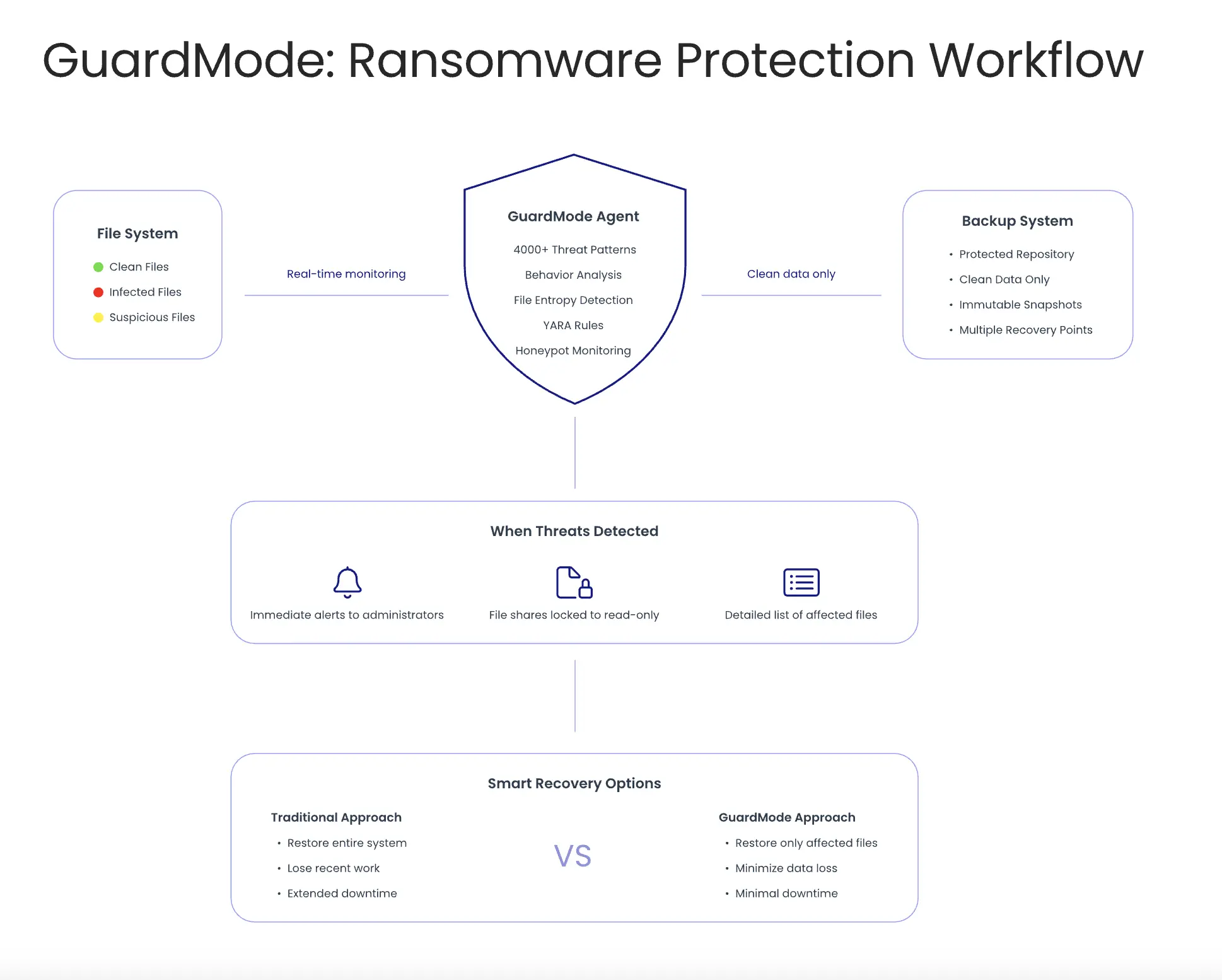
GuardMode ist ein System zur Erkennung und Abwehr von Ransomware, das speziell für Backup-Umgebungen entwickelt wurde und sich nahtlos in Catalogic DPX integriert. Im Gegensatz zu herkömmlicher Sicherheitssoftware, die Angriffe an Netzwerkeingängen abwehren soll, überwacht GuardMode Ihre Daten auf zwei Ebenen: 

  • Direkt vor dem Backup, um Bedrohungen zu erkennen, die anderen Schutzmechanismen entgangen sind 
  • Nach dem Backup, als zusätzliche Verteidigungsschicht für Systeme, die nicht vor dem Schutzprozess gescannt werden können 

Das Konzept hinter GuardMode ist einfach: Backup-Administratoren brauchen eigene Sicherheitstools, die direkt mit ihren Backup-Prozessen und DPX-Workflows integriert sind. Anstatt sich auf das Security-Team zu verlassen, können Backup-Teams kompromittierte Daten erkennen und sofort innerhalb der gewohnten DPX-Oberfläche reagieren. 

GuardMode arbeitet als integraler Bestandteil der Vor- und Nachsicherungs-Scanschichten von DPX. Es analysiert Dateien kontinuierlich, um ransomewaretypisches Verhalten zu erkennen, bevor die Daten im Backup landen. Die enge Integration verhindert, dass infizierte Dateien Ihre Wiederherstellungsoptionen beeinträchtigen, und bietet detaillierte Informationen über betroffene Dateien – alles über die vorhandene DPX-Konsole zugänglich. 

Integration in Backup-Systeme 

GuardMode funktioniert als Agent, den Sie auf Windows- und Linux-Servern installieren. Es überwacht Dateisysteme in Echtzeit und erkennt verdächtige Aktivitäten wie ungewöhnliche Dateioperationen oder schnelle Verschlüsselungsprozesse. 

Das System ist offen konzipiert, bietet REST-APIs und unterstützt Standardprotokolle wie Syslog, um mit vorhandener Backup- und Sicherheitsinfrastruktur zu arbeiten. Bei verdächtigem Verhalten kann GuardMode automatisch Schutzmaßnahmen auslösen: Freigaben schreibschützen, sofort Snapshots erstellen oder Warnmeldungen an Backup- und Sicherheitsteams senden. 

Wichtige Unterschiede zu herkömmlicher Sicherheitssoftware 

Klassische Endpoint-Tools wie Antivirusprogramme und Firewalls blockieren Bedrohungen am Netzwerkeingang. Sie erkennen bekannte Malware-Signaturen und verhindern schädliche Downloads oder Anhänge. 

GuardMode verfolgt einen anderen Ansatz und ergänzt diese Funktionen. Es geht davon aus, dass einige Bedrohungen durchkommen, und konzentriert sich stattdessen auf die durch Ransomware verursachten Auswirkungen – insbesondere auf Verschlüsselungs- und Änderungsmuster. 

Durch diesen verhaltensbasierten Ansatz kann GuardMode auch neue Ransomware erkennen, die in keiner Signaturdatenbank steht.Es erkennt die Auswirkungen der Ransomware und nicht deren Code – und schützt so vor bekannten und unbekannten Bedrohungen. 

Ein weiterer Unterschied liegt im Timing: Herkömmliche Tools erkennen Bedrohungen beim Eintritt. GuardMode überwacht kontinuierlich den Zustand Ihrer Datenumgebung und erkennt auch schleichende oder später auftretende Infektionen. Damit wird es zur echten Ransomware Protection für Backups. 

Zielgruppe: Backup-Admins und IT-Teams 

GuardMode wurde speziell für Backup-Administratoren entwickelt – also für jene, die dafür sorgen müssen, dass Daten im Notfall wiederhergestellt werden können. Während Security-Teams Angriffe verhindern wollen, brauchen Backup-Teams Tools, um auf bereits erfolgte Angriffe reagieren zu können. 

Die Software bietet Backup-Admins Funktionen, die sie bisher nicht hatten: 

  • Transparenz zur Datenintegrität: Welche Dateien sind betroffen, welche sauber? 
  • Granulare Wiederherstellung: Nur kompromittierte Dateien wiederherstellen statt ganzer Systeme 
  • Integration in bestehende Workflows: Alarme und Reaktionen innerhalb der Backup-Prozesse 
  • Wiederherstellungshilfe: Schritt-für-Schritt-Anleitungen bei der Recovery 

Auch IT-Teams profitieren: Sie erhalten detaillierte Infos zum Schadensausmaß und klare Wiederherstellungsoptionen – weniger Raten, weniger Stress. Gerade in hybriden Umgebungen mit On-Premises- und Cloud-Infrastruktur bietet GuardMode konsistenten Schutz für Dateifreigaben und Speichersysteme über alle Plattformen hinweg. 

Fazit 

GuardMode steht für den Wechsel von reaktiver zu proaktiver Datensicherung. Es gibt Backup-Teams die Werkzeuge an die Hand, um Bedrohungen frühzeitig zu erkennen und gezielt zu reagieren. Durch den klaren Fokus auf die Bedürfnisse von Backup-Admins schließt es eine kritische Lücke in vielen Ransomware-Abwehrstrategien und etabliert sich als effektive Ransomware Protection für Backups. 

Im nächsten Blogbeitrag werfen wir einen genaueren Blick auf die technischen Funktionen von GuardMode – wir erkunden seine Erkennungsmethoden, Überwachungsfunktionen und Wiederherstellungsoptionen. Außerdem betrachten wir praxisnahe Implementierungsaspekte und reale Anwendungsfälle, die zeigen, wie Organisationen GuardMode einsetzen, um ihre Resilienz gegenüber Ransomware zu stärken. 

Read More
07/23/2025 0 Comments

Datensicherung neu denken: DataCore Swarm optimal absichern mit Catalogic DPX

Moderne Unternehmen erzeugen heute mehr Daten denn je – Videos, Dokumente, Protokolle, Backups, Analysen und vieles mehr. Um mit diesem Wachstum Schritt zu halten, setzen viele auf objektbasierte Speicherlösungen wie DataCore Swarm. Swarm ist auf Skalierbarkeit und Ausfallsicherheit ausgelegt, doch wie jede Speicherplattform erfordert es einen verlässlichen Datenschutz. Wenn kritische Daten versehentlich gelöscht, beschädigt oder durch Ransomware verschlüsselt werden, nützt auch die leistungsfähigste Speicherlösung wenig – verlorene Daten bleiben im schlimmsten Fall für immer verloren. 

Catalogic DPX ist eine speziell entwickelte Backup- und Wiederherstellungslösung, die Daten über physische, virtuelle und Cloud-Umgebungen hinweg schützt. In diesem Artikel zeigen wir, wie DPX und Swarm optimal zusammenwirken können, um skalierbare Speicherarchitekturen mit intelligenter Datensicherung zu kombinieren. 

Dieser Beitrag richtet sich an IT-Verantwortliche, Speicherarchitekt:innen und alle, die in Swarm-Umgebungen für Datenverfügbarkeit zuständig sind oder deren Einsatz planen. Sie erhalten einen praxisnahen Überblick über die Integration, deren Funktionsweise sowie die konkreten Anwendungsfälle. Egal, ob Sie eine neue Backup-Strategie aufbauen oder eine bestehende Lösung modernisieren möchten – dieser Leitfaden hilft Ihnen dabei, DataCore Swarm als Teil eines resilienten und zukunftssicheren Datenschutzkonzepts zu betrachten. 


1. Die neue Ära der Objektspeicherung: Warum DataCore Swarm eine intelligentere Backup-Strategie braucht

Organisationen verwalten heute mehr unstrukturierte Daten denn je – Mediendateien, Sensordaten, Protokolle, Backups, Archive und mehr. Herkömmliche Speicherlösungen stoßen unter dieser Last oft an ihre Grenzen. Deshalb setzen viele auf objektbasierte Plattformen wie DataCore Swarm. Swarm bietet ein skalierbares, robustes und selbstheilendes Speichersystem, ideal für große Datenmengen mit langfristiger Aufbewahrung. 

Doch auch wenn Swarm beim Speichern großer Datenmengen überzeugt, ersetzt es keine dedizierte Datensicherung. Objektspeicher bieten keinen Schutz vor versehentlichem Löschen, Ransomware-Angriffen, Softwareausfällen oder böswilligen Änderungen. Versionierung und Replikation helfen – sind aber kein Ersatz für echte Backups. 

Diese Lücke wird deutlich, wenn Objektspeicher nicht nur für Archive, sondern auch für produktive Anwendungen genutzt werden – etwa Mediatheken, Videoüberwachung, Forschungsdaten oder Analyse-Workloads. Je wertvoller die Daten, desto größer das Risiko von Verlust oder Beschädigung. Und die Wiederherstellung von Petabytes rein über Replikate reicht oft nicht aus, um betriebliche Anforderungen zu erfüllen. 

Gefragt ist ein moderner, intelligenter Ansatz – abgestimmt auf die heutige Nutzung von Objektspeichern, mit zuverlässigem, effizientem Schutz. In Kombination mit Catalogic DPX erhält DataCore Swarm genau diese fehlende Backup- und Recovery-Schicht. Gemeinsam entsteht eine leistungsfähige Plattform für skalierbare Datenspeicherung mit unternehmensgerechtem Schutz. 


2. Warum DPX? Backup modernisieren für verteilte Objektspeicher

Die DPX-Unterstützung für DataCore Swarm ist keine nachträglich angepasste Altlösung – sie wurde gezielt für objektbasiertes Backup von NAS- und Objektspeichern entwickelt. 

Was DPX besonders wirkungsvoll macht: 

  • Protokollbewusstes Backup
    DPX integriert sich direkt mit S3-kompatiblen Speichern (wie Swarm) – ohne Drittanbieter-Plugins oder eigene Konnektoren. Dadurch wird ein direkter Zugriff auf Buckets und Objekte für Backup und Wiederherstellung ermöglicht. 
  • Effiziente Datenverarbeitung
    Mit integrierter Deduplizierung und Komprimierung reduziert DPX die zu übertragende und zu speichernde Datenmenge erheblich – besonders vorteilhaft bei großen, redundanten Datensätzen in Medien-, Überwachungs- und Forschungsanwendungen. 
  • Granulare Wiederherstellung
    Egal ob einzelne Datei oder kompletter Bucket – mit DPX und vStor lässt sich gezielt genau das wiederherstellen, was benötigt wird. 

Mit DPX in einer Swarm-Umgebung geht es nicht nur darum, Compliance-Anforderungen zu erfüllen – es geht darum, Daten intelligent zu schützen und wiederherstellen zu können, ohne auf Leistung oder Skalierbarkeit verzichten zu müssen. 

Kurz gesagt: DPX macht aus Swarm mehr als nur einen skalierbaren Objektspeicher – es wird zur Plattform für geschäftskritische, wiederherstellbare Daten-Workloads. 


3. Integrationsleitfaden: So schützt DPX DataCore Swarm nahtlos

Immer mehr Unternehmen setzen bei skalierbaren Backup-Lösungen auf S3-kompatiblen Objektspeicher. Catalogic DPX 4.12 bietet umfassende Unterstützung für Backups von S3-Objektspeicher, einschließlich DataCore-Implementierungen. Der folgende Überblick zeigt die wichtigsten Schritte – von der Ersteinrichtung bis zur automatisierten Zeitplanung. 


S3-Objektspeicher verstehen 

S3-kompatible Speicher organisieren Daten in Buckets mit eindeutigen Objekten. Diese Struktur ermöglicht eine effiziente Organisation und Abfrage von Daten mit hoher Skalierbarkeit. Mit DPX lässt sich diese Technologie nahtlos in umfassende Datenschutzstrategien einbinden. 


Vierstufiger Backup-Prozess 

Phase 1: Sicherheitsgrundlage 

Bevor Sie eine Verbindung zu Ihrem S3-Speicher herstellen, ist die Einrichtung einer sicheren Kommunikation entscheidend. Dazu gehört die Verwaltung von Zertifikaten und die Gewährleistung vertrauenswürdiger Verbindungen zwischen Ihrem DPX-Master-Server und dem DataCore-S3-Speicher. Der Prozess umfasst das Importieren von SSL-Zertifikaten sowie die Konfiguration verschlüsselter Kommunikationskanäle. Ausführliche Anleitungen zum Zertifikatimport finden Sie unter: Adding an S3 Object Storage Node 


Phase 2: Integration des Speicherknotens 

Nach erfolgreicher Einrichtung der Sicherheitsverbindung wird der DataCore-S3-Speicher als Knoten in die DPX-Umgebung integriert. Dieser Schritt beinhaltet die Konfiguration von Endpunkten, Zugangsdaten und Adressierungsschemata. DataCore-Implementierungen erfordern hierbei häufig spezifische Adressformate, die von den Standard-Einstellungen bei AWS abweichen. Die Knoten-Konfiguration erfolgt über die benutzerfreundliche DPX-Weboberfläche, die integrierte Testfunktionen zur Überprüfung der Konnektivität vor dem Abschluss der Einrichtung bereitstellt. Alle Details zur Knoten-Konfiguration finden Sie unter: Adding an S3 Object Storage Node 

Phase 3: Backup-Job einrichten

Für eine effektive Sicherung müssen Quell-Buckets ausgewählt, Zielorte definiert und Aufbewahrungsrichtlinien festgelegt werden. Catalogic DPX setzt vStor 4.12 oder neuer als Backup-Ziel voraus. Dabei wird für jeden geschützten Bucket ein separates Volume angelegt. Der Backup-Prozess unterstützt die Versionierung von S3-Objekten und erlaubt flexible Verwaltung von Backup-Jobs. Unternehmen können mehrere Backup-Jobs für unterschiedliche Bucket-Gruppen einrichten oder bestehende Buckets durch nachfolgende Job-Läufe aktualisieren. Schritt-für-Schritt-Anleitung zur Job-Erstellung: Creating an S3 Object Storage Backup 


Phase 4: Automatisierung & Zeitplanung

Die automatisierte Zeitplanung sorgt für kontinuierlichen Datenschutz – ganz ohne manuelle Eingriffe. Das System bietet flexible Optionen für tägliche, wöchentliche oder monatliche Backup-Zyklen mit individuell anpassbaren Aufbewahrungsfristen und Startzeiten. Unternehmen können bestehende Zeitpläne flexibel anpassen oder neue Jobs basierend auf ihren Datenschutzanforderungen und Betriebszeiten einrichten. Konfigurationsdetails zur Planung: Scheduling an S3 Object Storage Backup Job 


Wichtige Voraussetzungen und Hinweise

Systemanforderungen: 

  • Catalogic DPX 4.12 mit Zugriff auf die Weboberfläche 
  • vStor 4.12 oder neuer als Backup-Ziel 
  • S3-Buckets mit aktivierter Versionierung 
  • Synchronisierte Systemuhren auf allen beteiligten Systemen 

Wichtige Hinweise: 

  • Die S3-Backup-Funktionen sind ausschließlich über die Weboberfläche verfügbar 
  • Bei DataCore-Implementierungen sind möglicherweise spezielle Adressierungsschemata erforderlich 
  • Für alle Verbindungen sind gültige Sicherheitszertifikate zwingend notwendig 

Vollständige technische Übersicht: S3 Object Storage Backup 

Vorteile und Nutzen 

Die Implementierung von S3-Backups für DataCore mit Catalogic DPX bietet eine Vielzahl an Vorteilen: 

  • Skalierbarkeit: Die Architektur des Objektspeichers wächst flexibel mit den Anforderungen Ihrer Organisation 
  • Effizienz: Automatisierte Zeitplanung reduziert den administrativen Aufwand erheblich 
  • Zuverlässigkeit: Integrierte Versionierung und Aufbewahrungsmanagement sorgen für nachvollziehbaren Datenschutz 
  • Sicherheit: Verschlüsselte Kommunikation und zertifikatsbasierte Authentifizierung gewährleisten sichere Verbindungen 
  • Integration: Nahtlose Einbindung in bestehende DPX-Umgebungen ohne zusätzlichen Integrationsaufwand 

4. Ihre DataCore-Swarm-Investition zukunftssicher machen mit Catalogic DPX

Mit der stetig wachsenden Datenmenge und sich wandelnden Speicheranforderungen benötigen Unternehmen Lösungen, die sich flexibel anpassen – ohne dass eine komplette Umstrukturierung der Infrastruktur erforderlich ist. Die Kombination aus DataCore Swarm und Catalogic DPX bildet eine skalierbare Grundlage, die mit Ihrem Unternehmen mitwächst und dabei gleichbleibend hohe Standards im Datenschutz gewährleistet. 


Mit Ihren Datenanforderungen wachsen 

Elastischer Schutz:
Wenn Ihre Swarm-Umgebung von Terabytes auf Petabytes anwächst, skaliert DPX nahtlos mit. Die Backup-Infrastruktur wird dabei nicht zum Engpass, sondern zum Enabler. Ob Sie neue Buckets hinzufügen, zusätzliche Standorte integrieren oder neue Datenquellen anbinden – das Schutzkonzept passt sich automatisch an. 

Betriebliche Konsistenz:
Einmal eingerichtet, bleibt die Integration von DPX und Swarm unabhängig vom Umfang konsistent. Ihr Team muss keine neuen Abläufe erlernen oder verschiedene Tools verwalten, wenn das Datenvolumen steigt. Das operative Modell, das bei Hunderten von Gigabyte funktioniert, funktioniert genauso bei Hunderten von Terabyte. 


Vorbereitung auf zukünftige Herausforderungen 

  • Ransomware-Resilienz:
    Mit zunehmender Komplexität von Cyberbedrohungen wird der Zugriff auf isolierte, versionierte Backups geschäftskritisch. DPX bietet genau diese Air-Gap-Ebene, die über die native Replikation von Swarm hinausgeht. Im Ernstfall stehen Ihnen saubere Wiederherstellungspunkte außerhalb der kompromittierten Umgebung zur Verfügung. 
  • Evolving Compliance:
    Vorgaben zur Datenaufbewahrung und zum Datenschutz unterliegen einem stetigen Wandel. Die Kombination aus DPX und Swarm bietet die nötige Flexibilität, um Aufbewahrungsrichtlinien anzupassen, rechtliche Sperren umzusetzen und Compliance nachzuweisen – ohne den laufenden Betrieb zu stören. Die Infrastruktur passt sich an neue Anforderungen an, statt ersetzt werden zu müssen. 
  • Multi-Cloud-Strategie:
    Viele Unternehmen verfolgen inzwischen hybride oder Multi-Cloud-Architekturen. DPX bietet die Möglichkeit, Datenumgebungen plattformübergreifend zu schützen – inklusive Cloud-Objektspeicher. So kann Ihre Swarm-Infrastruktur problemlos mit zukünftigen Cloud-Initiativen koexistieren, anstatt mit ihnen zu konkurrieren. 

Investitionsschutz 

DataCore Swarm stellt eine bedeutende Infrastrukturinvestition dar. Sie zu schützen bedeutet, sicherzustellen, dass sie langfristig geschäftskritische Funktionen zuverlässig erfüllt. DPX verwandelt Swarm von einer reinen Speicherplattform in eine vertrauenswürdige Datenbasis, auf der wichtige Workloads sicher ausgeführt werden können. 

Die Integration deckt nicht nur aktuelle Backup-Anforderungen ab – sie schafft eine Plattform, die sich mit den Anforderungen Ihres Unternehmens im Bereich Datensicherheit weiterentwickeln kann. Wenn Speicherbedarf, Bedrohungslage und Geschäftsziele sich verändern, bietet das DPX-Swarm-Fundament die nötige Stabilität und Flexibilität, um sich anzupassen – ohne von Grund auf neu beginnen zu müssen.  


Fazit 

DataCore Swarm bietet klare Vorteile für Unternehmen, die große Mengen unstrukturierter Daten verwalten müssen. Seine Skalierbarkeit, Performance und Kosteneffizienz machen es zur idealen Basis für moderne Speicherstrategien. Doch Speicherplattformen allein reichen nicht aus – vollständiger Datenschutz erfordert speziell entwickelte Backup- und Recovery-Lösungen. 

Catalogic DPX schließt diese Lücke, indem es Unternehmensschutz auf Swarm-Umgebungen überträgt. Die Integration ist unkompliziert, der Betrieb automatisiert, und das Ergebnis ist die Gewissheit, dass Ihre Daten sicher, wiederherstellbar und bei Bedarf verfügbar sind. 

Für Organisationen, die ihre Dateninvestitionen ernsthaft schützen möchten – ohne auf die Skalierbarkeit von Objektspeicher zu verzichten – bietet die Kombination aus DataCore Swarm und Catalogic DPX eine bewährte und praxisorientierte Lösung. Denn es geht nicht nur darum, ein Backup zu haben – sondern das richtige Backup: intelligent verwaltet und verfügbar, wenn Ihre Geschäftskontinuität davon abhängt. Die Frage ist nicht, ob Ihre Swarm-Umgebung besseren Datenschutz braucht – sondern, ob Sie bereit sind, ihn zu implementieren, bevor Sie ihn wirklich brauchen. 

➡️ Erfahren Sie mehr in der gemeinsamen Lösungsvorstellung von Catalogic DPX und DataCore Swarm. 

Read More
07/23/2025 0 Comments

Catalogic vStor: Eine moderne softwaredefinierte Backup-Speicherplattform

Bei Catalogic betonen wir immer wieder, dass zuverlässige Backups nicht nur wichtig – sondern absolut unerlässlich sind. Doch was passiert, wenn die Backups selbst zum Ziel werden? Genau für dieses Problem haben wir eine moderne Speicherlösung entwickelt. Das bedeutet: DPX-Kunden sind in einer besonders vorteilhaften Position. Anstatt sich nach einer kompatiblen Backup-Speicherlösung umzusehen, erhalten sie vStor direkt als Teil der DPX suite. Damit profitieren sie automatisch von Funktionen auf Enterprise-Niveau wie Deduplizierung, Komprimierung und – am wichtigsten – robusten Unveränderlichkeitskontrollen, die Backups vor unautorisierten Änderungen schützen. 

Durch die Kombination der Backup-Funktionen von DPX mit der sicheren Speicherbasis von vStor erhalten Unternehmen ein vollständiges Schutzsystem, das weder proprietäre Hardware noch komplexe Integrationsarbeiten erfordert. Es ist ein praxisnaher, kosteneffizienter Ansatz, um sicherzustellen, dass Ihre Unternehmensdaten sicher und wiederherstellbar bleiben – egal welche Bedrohungen auftreten. 


Einleitung

Dieser Artikel führt Sie durch die Funktionen und Vorteile der Nutzung von vStor. Für viele unserer Kunden dient er als Auffrischung – gleichzeitig aber auch als Erinnerung daran, sicherzustellen, dass sie die neueste und leistungsfähigste Lösung nutzen und vor allem: alle Vorteile ausschöpfen, die vStor bietet. Los geht’s! 

Catalogic vStor ist ein softwaredefiniertes Speichergerät, das primär als Backup-Repository für die Datensicherungslösung DPX von Catalogic konzipiert ist. Es läuft auf handelsüblicher Hardware (physisch oder virtuell) und nutzt das ZFS-Dateisystem, um Enterprise-Funktionen wie Inline-Deduplizierung, Komprimierung und Replikation auf Standardservern bereitzustellen. Dieser Ansatz ermöglicht ein kostengünstiges und gleichzeitig widerstandsfähiges Repository, dass Organisationen von proprietären Backup-Appliances und Anbieterabhängigkeit befreit. 

Speicherfunktionen

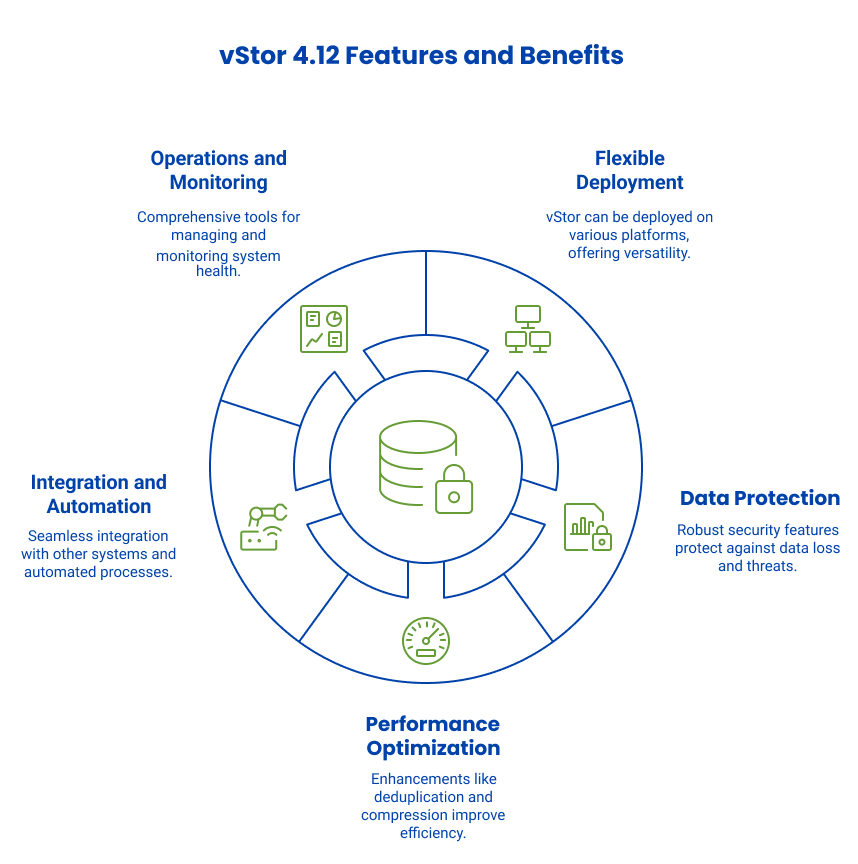
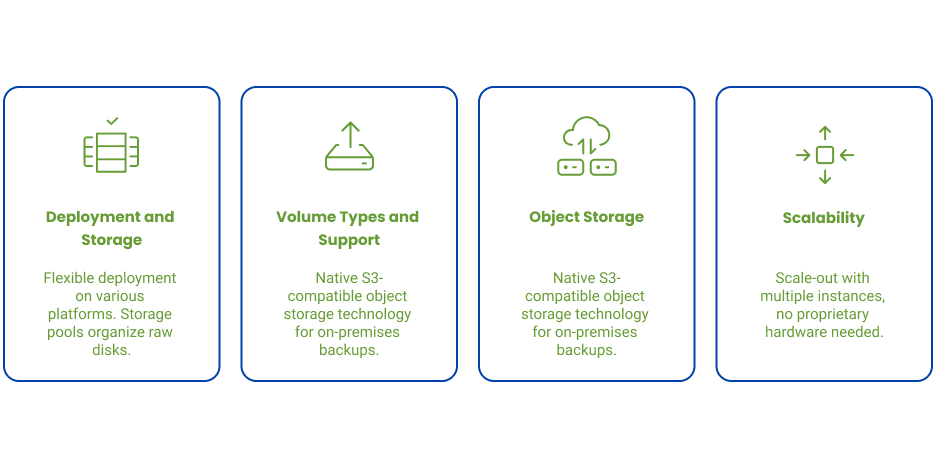
Flexible Bereitstellung und Speicherpools: vStor läuft auf verschiedenen Plattformen (VMware, Hyper-V, physische Server) und verwendet Speicherpools zur Organisation physischer Festplatten. Administratoren können mehrere Festplatten (DAS, SAN LUNs) zu erweiterbaren Pools zusammenfassen, die mit dem Datenwachstum mitwachsen. Als softwaredefinierte Lösung funktioniert vStor mit jedem Blockgerät ohne proprietäre Einschränkungen. 

Volumentypen und Protokollunterstützung: vStor bietet vielseitige Volumentypen, darunter Blockgeräte als iSCSI-LUNs (ideal für “incremental forever” Backups) und dateibasierte Speicher mit NFS- und SMB-Protokollen (oft für agentenlose VM-Backups genutzt). Das System unterstützt mehrere Netzwerkschnittstellen und Multipathing für hohe Verfügbarkeit in SAN-Umgebungen. 

Objektspeicher: Eine herausragende Funktion in vStor 4.12 ist die native S3-kompatible Objektspeichertechnologie. Jede Appliance enthält einen Objektspeicherserver, mit dem Administratoren S3-kompatible Volumes mit eigenen Zugangsschlüsseln und Webkonsole erstellen können. So lassen sich Backups lokal in einem S3-kompatiblen Repository speichern – anstatt sie sofort in eine Public Cloud zu übertragen. Die Objektspeicherfunktion unterstützt auch Object Lock für Unveränderlichkeit. 

Skalierbarkeit: Als softwaredefinierte Lösung kann vStor mit mehreren Instanzen skaliert werden – nicht nur mit einer einzelnen Appliance. Unternehmen können Nodes mit unterschiedlichen Spezifikationen an verschiedenen Standorten bereitstellen. Proprietäre Hardware ist nicht erforderlich – jeder Server mit ausreichenden Ressourcen kann als vStor-Node fungieren, im Gegensatz zu traditionellen, speziell entwickelten Backup-Appliances. 

Datensicherung und Wiederherstellung

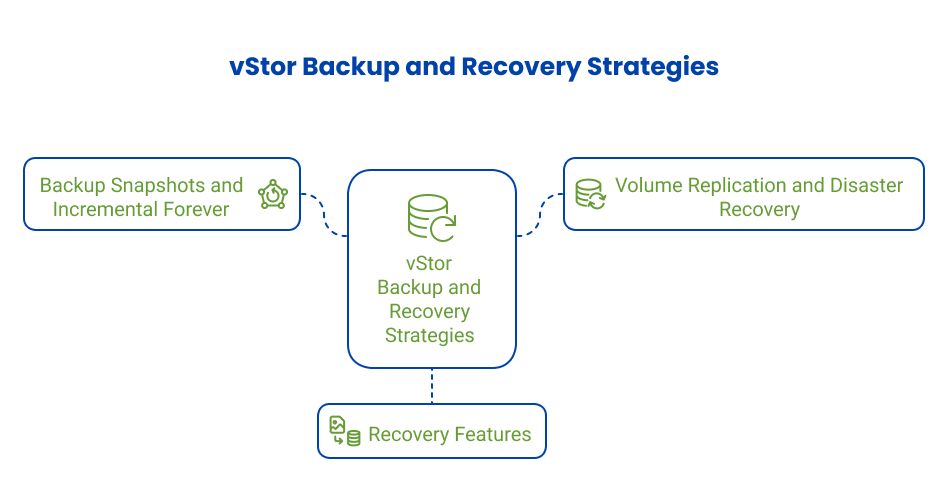
Backup-Snapshots und “Incremental Forever”: vStor nutzt ZFS-Snapshot-Technologie, um zeitpunktgenaue Abbilder von Backup-Volumes zu erstellen – ohne vollständige Datenkopien. Jedes Backup wird als unveränderlicher Snapshot mit nur geänderten Blöcken gespeichert – ideal für inkrementelle Strategien. Mit Catalogics Snapshot Explorer oder durch Einbinden von Volume-Snapshots können Administratoren direkt auf Backups zugreifen, Daten überprüfen oder Dateien extrahieren – ohne die Backup-Kette zu beeinträchtigen. 

Volume-Replikation und Notfallwiederherstellung: vStor bietet Punkt-zu-Punkt-Replikation zwischen Appliances für DR-Szenarien und Backup-Konsolidierung in Außenstellen. Volumes können asynchron und auf Snapshot-Basis repliziert werden, wobei nur geänderte Daten übertragen werden. vStor 4.12 führt Replikationsgruppen ein, um mehrere Volumenreplikationen gemeinsam zu verwalten. 

Wiederherstellungsfunktionen: Da Backups als Snapshots vorliegen, kann eine Wiederherstellung entweder vor Ort oder durch Bereitstellung des Backup-Volumes auf Produktivsystemen erfolgen. Mit Instant Access Recovery können Backup-Volumes direkt per iSCSI oder NFS eingebunden und sofort genutzt oder sogar als VM gestartet werden – dies reduziert Ausfallzeiten erheblich. Catalogic DPX bietet mit Rapid Return to Production (RRP) eine Lösung zur schnellen Rückführung von Backups in Produktivsysteme – mit minimalem Kopieraufwand. 

Sicherheit und Compliance

Benutzerzugriff und Multi-Tenancy: vStor nutzt rollenbasierte Zugriffskontrolle mit Admin- und Standardbenutzern. Letztere können auf bestimmte Speicherpools beschränkt werden – ideal für Szenarien, in denen mehrere Abteilungen dieselbe Appliance nutzen. Verwaltungshandlungen erfordern Authentifizierung; Multi-Faktor-Authentifizierung (MFA) wird unterstützt. 

Datenverschlüsselung: vStor 4.12 unterstützt Volumenverschlüsselung zur Sicherung der Vertraulichkeit. Bei der Volume-Erstellung kann die Verschlüsselung aktiviert werden. Ein Auto-Unlock-Mechanismus (Encryption URL) erlaubt das Abrufen des Schlüssels von einem sicheren Remote-Server per SSH. Management-Kommunikation erfolgt über HTTPS, und Replikationen lassen sich verschlüsselt und komprimiert übertragen. 

Unveränderlichkeit und Löschschutz: Eine zentrale Sicherheitsfunktion ist die Kontrolle über die Unveränderlichkeit. Snapshots und Volumes können für definierte Aufbewahrungszeiträume gegen Löschung oder Veränderung gesperrt werden – entscheidend für den Schutz vor Ransomware. vStor bietet zwei Modi: Flexible Protection (entsperrbar mit MFA) und Fixed Protection (vergleichbar mit WORM, nicht vor Ablauf entsperrbar). Diese Funktionen verbessern die Compliance und Abwehrfähigkeit. 

Ransomware-Erkennung (GuardMode): vStor 4.12 führt GuardMode Scan ein – eine Funktion zur Analyse von Snapshots auf Ransomware-Indikatoren. Administratoren können Snapshots manuell oder automatisch scannen lassen. Bei Entdeckung verdächtiger Muster erfolgt eine Alarmmeldung – so wird vStor vom passiven Speicher zur aktiven Sicherheitskomponente. 


Performance und Effizienz

Inline-Deduplizierung: vStor nutzt ZFS-Deduplizierung, um redundante Datenblöcke zu vermeiden und Speicherplatz zu sparen. Besonders effektiv bei Backups mit hoher Redundanz (z. B. viele VMs mit identischem OS). Übliche Deduplizierungsraten liegen bei 2:1 bis 4:1 – in Einzelfällen sogar 7:1 in Kombination mit Komprimierung. Die Deduplizierung erfolgt inline beim Schreiben. 

Komprimierung: Ergänzend zur Deduplizierung wird die Komprimierung auf alle in den Pool geschriebenen Daten angewendet. Je nach Datentyp lassen sich Größenreduktionen von 1.5:1 bis 3:1 erzielen. In Kombination senken diese Techniken die Kosten pro Terabyte deutlich – entscheidend bei langen Aufbewahrungszeiträumen. 

Performance-Tuning: vStor übernimmt ZFS-Funktionen zur Leistungsoptimierung bei Lese- und Schreibvorgängen. Administratoren können SSDs als Write-Logs (ZIL) oder Read-Caches (L2ARC) einbinden, um Recovery-Performance zu steigern. Diese Geräte lassen sich direkt in den Pool integrieren. 

Netzwerkoptimierung: vStor unterstützt Funktionen wie Bandbreitenbegrenzung und Replikationskomprimierung. Netzwerkschnittstellen lassen sich für verschiedene Aufgaben (z. B. Management, Backup, Replikation) dedizieren. Mit geeigneter Hardware (SSD, CPU) kann vStor die Leistung proprietärer Backup-Appliances erreichen – ganz ohne deren Einschränkungen. 


Integration und Automatisierung

DPX-Integration: vStor lässt sich nahtlos mit DPX verbinden. In der DPX-Konsole lassen sich vStor-Volumes (iSCSI oder S3) als Backup-Ziele definieren. vStor nutzt MinIO, um ein lokales S3-Ziel bereitzustellen – cloudartige Speicherstrukturen vor Ort. 

Drittsysteme: Trotz DPX-Optimierung unterstützt vStor Standardprotokolle (iSCSI, NFS, SMB, S3), wodurch auch Drittanbieter-Software oder Virtualisierungsplattformen angebunden werden können. Diese Offenheit unterscheidet vStor von vielen Appliances, die nur mit ihrer eigenen Software funktionieren. 

Cloud-Anbindung: vStor 4.12 kann als Gateway zur Cloud agieren. Eine Instanz lässt sich in der Cloud bereitstellen und als Ziel für Replikationen von On-Prem-Systemen nutzen. Mittels MinIO oder DPX kann an Anbieter wie AWS, Azure oder Wasabi archiviert werden – inklusive Object Lock. 

Automatisierung: vStor bietet eine Kommandozeilenschnittstelle (CLI) und eine REST-API zur Automatisierung. Alle Funktionen der Weboberfläche lassen sich per CLI aufrufen – ideal für Tools wie Ansible oder PowerShell. Die REST-API ermöglicht Monitoring und Integration in DevOps-Prozesse. 


Betrieb und Monitoring

Management-Oberfläche: vStor bietet ein webbasiertes Interface für Verwaltung und Konfiguration. Das Dashboard zeigt Kapazitäten, Volumenzustände und Replikationen an. Über separate Bereiche für Speicher, Datenschutz und System lassen sich Funktionen leicht verwalten. 

Systemkonfiguration: Zum Betrieb gehören Einstellungen wie Netzwerk, Zeit (NTP), Zertifikate und Systempflege. Neue Festplatten können erkannt werden, ohne den Server neu zu starten – das erleichtert Erweiterungen. 

Monitoring: Alarme bei Fehlern (z. B. Replikation, Festplatten) erscheinen in der Oberfläche. Administratoren sollten auch Kapazitätstrends und Replikationsverzögerungen im Blick behalten. Die Alarmierung lässt sich mit externen Tools ergänzen. 

Support und Fehlerbehebung: vStor kann Support-Bundles mit Logs und Konfigurationen erzeugen. Die Dokumentation deckt häufige Fragen und Best Practices ab – etwa die Empfehlung, weniger große Pools statt vieler kleiner zu verwenden, um Fragmentierung zu reduzieren. 


Fazit

Catalogic vStor 4.12 ist eine umfassende Backup-Speicherlösung mit Enterprise-Funktionen und robustem Datenschutz. Sicherheitsfunktionen wie MFA, Unveränderlichkeit und Ransomware-Scanning schützen vor Cyberbedrohungen, während Performance-Optimierungen eine kosteneffiziente Speicherung bei gleichzeitig schnellen Wiederherstellungen ermöglichen. 

vStor zeichnet sich durch Flexibilität und Offenheit im Vergleich zu proprietären Appliances aus. Es kann auf vorhandener Hardware betrieben werden und bietet fortschrittliche Speichertechnologien sowie einzigartige Funktionen wie nativen Objektspeicher und Ransomware-Erkennung. 

Typische Anwendungsfälle: 

  • Zentrales Backup-Repository für Rechenzentren 
  • Backup in Außenstellen mit Replikation zur Zentrale 
  • Ransomware-resistenter Backup-Speicher mit Unveränderlichkeit 
  • Archivierung und Cloud-Gateway für gestaffelte Backup-Strategien 
  • Test-/Entwicklungsumgebungen mit Snapshot-Funktionen 

Mit vStor modernisieren Organisationen ihre Datensicherungsinfrastrukturaus einem klassischen Backup-Repository wird eine smarte, skalierbare Plattform, die aktiv zur unternehmensweiten Datenstrategie beiträgt.

Read More
07/23/2025 0 Comments

Vorstellung Backup-Verifizierung in DPX 4.13

Wenn Sie dafür verantwortlich sind, Daten sicher zu halten – ob im IT‑Betrieb, in der Infrastrukturverwaltung oder in der Cybersicherheit – sind Backups Ihr Sicherheitsnetz. Sie greifen, wenn Systeme ausfallen, Dateien verschwinden oder Ransomware zuschlägt. Aber eines ist entscheidend: Sie müssen Verifizierungen durchführen. Nur weil ein Backup als „erfolgreich“ gemeldet wird, heißt das nicht, dass es auch wirklich wiederherstellbar ist. Viele Backup‑Systeme prüfen nicht, ob die Daten auch tatsächlich zurückgespielt werden können. Sie warnen nicht, wenn Dateien beschädigt oder unvollständig sind – oder schlimmer noch, bereits mit Malware verseucht. Und am Tag der Wiederherstellung stehen Sie ratlos da. 

DPX 4.13 führt nun eine automatische Backup‑Verifizierung ein – für alle, die sich kein Rätselraten leisten können. IT‑Administratoren, System‑Ingenieure, Backup‑Operatoren und Cyber‑Security‑Teams erhalten Gewissheit – nicht nur Hoffnung –, dass ihre Backups funktionieren. Direkt nach jedem Backup läuft automatisch eine Verifizierung, inklusive integriertem Malware‑Scan, damit Probleme früh erkannt und behoben werden – noch bevor eine Wiederherstellung nötig wird. 


Warum herkömmliche Backups nicht ausreichen 

Ein grünes Licht im Backup‑Dashboard wirkt oft beruhigend, kann aber trügerisch sein. Viele Systeme melden nur, dass Daten kopiert wurden – nicht, ob das Backup auch wirklich wiederherstellbar ist. Wenn es beschädigt ist oder versteckte Malware enthält, merken Sie es erst beim Wiederherstellungstest – dann ist es zu spät. 

DPX 4.13 geht dieses Problem aktiv an: Es prüft die Integrität des Backups und scannt auf Malware. So gewinnen Sie echte Sicherheit, dass Ihre Daten tatsächlich sauber und wiederherstellbar sind. 


Was DPX 4.13 anders macht 

DPX 4.13 führt eine automatische BackupVerifizierung mit zwei zentralen Schritten ein: Integritätsprüfung und Bedrohungsscans. Beides erfolgt direkt nach Abschluss des Backups – ganz ohne manuelle Eingriffe Ihres Teams. 

Dateien‑System‑Prüfung 

DPX mountet das Backup wie für eine vollständige Wiederherstellung. Anschließend werden Dateisystem, Partitionslayout und Zugriffsrechte geprüft. Wenn etwas nicht stimmt – etwa Datenkorruption, fehlende Rechte oder strukturelle Probleme – wird das sofort alarmiert. 

Malware‑Scan (GuardMode) 

Sobald das Backup die Integritätsprüfung bestanden hat, startet GuardMode einen Scan auf bekannte Malware-Signaturen und unregelmäßiges Dateiverhalten – etwa typische Merkmale von Ransomware oder schlafenden Bedrohungen. 

Live‑Monitoring und Alarmierung 

Jeder Schritt des Verifizierungsprozesses ist in Echtzeit sichtbar. Wenn die Verifizierung fehlschlägt oder eine Bedrohung entdeckt wird, erhält Ihr Team unmittelbar eine Benachrichtigung über das integrierte Alarmsystem. 


Wo es funktioniert 

DPX 4.13 unterstützt zwei Backup‑Typen von Haus aus: 

VMware‑Backups 

Für agentenlose VMware‑Jobs mountet und prüft DPX die VM‑Backups automatisiert – ganz ohne Agent auf den Gastsystemen. Mehrere Festplatten, komplexe Partitionen und verschiedene Dateisysteme werden nahtlos abgedeckt. 

Block‑Level‑Backups 

Die gleiche Verifizierungs‑Engine kommt auch bei physischen Server‑ oder Bare‑Metal‑Backups zum Einsatz. Egal welches Betriebssystem, Partitionsschema oder Wiederherstellungsformat – Sie erhalten überall dieselbe Validierung. 


Wichtiger Hinweis: vStor erforderlich 

Diese neue Verifizierungsfunktion ist nur nutzbar, wenn Ihre Backups in Catalogics vStor gespeichert sind. Nur vStor bietet die nötige Mount‑Technologie, um Restore‑Simulationen und Scans durchzuführen. Wenn Sie ein anderes Storage‑Backend verwenden, müssen Sie Ihre Backups auf vStor migrieren, um diese Funktion nutzen zu können. 

Die enge Integration mit vStor gewährleistet reibungslose Performance, schnelle Scans und verlässliche Ergebnisse – ohne Ihre Produktionssysteme zu belasten. 


So funktioniert’s – ein Blick hinter die Kulissen 

Nach Abschluss eines Backups läuft folgender Prozess automatisch ab: 

  1. Backup ist abgeschlossen 
  2. Verifizierung startet (vorausgesetzt aktiviert) 
  3. DPX greift auf das Backup über vStor zu 
  4. Dateien‑Systemprüfung – Integrität & Zugriffsrechte 
  5. GuardMode‑Scan – Malware‑Erkennung (falls aktiviert) 
  6. Ergebnisse erscheinen im Backup‑Job‑Bericht mit detaillierten Angaben 

Wenn das Backup die Dateisystemprüfung nicht besteht, wird der Malware‑Scan übersprungen – so werden keine Ressourcen auf beschädigte Daten verschwendet. Alle Ergebnisse werden geloggt und können für Audits oder Compliance‑Zwecke exportiert werden. 


Warum das im Alltag zählt 

Risiko reduzieren 

Die häufigsten Restore‑Fehler entstehen durch beschädigte Backups oder versteckte Malware. DPX 4.13 hilft, beides zu vermeiden. Es stellt sicher, dass Backups wiederherstellbar und frei von Bedrohungen sind. Für Unternehmen mit Compliance‑Anforderungen bieten die automatisierten Prüfungen und Audit‑Logs zusätzliche Sicherheit und Dokumentation. 

Zeit sparen 

Manuelle Restore‑Tests sind aufwendig und werden häufig übersprungen. Mit DPX 4.13 laufen sie automatisch im Hintergrund – ohne Eingriff Ihres Teams. Das System skaliert problemlos – egal, ob Sie 10 oder 10 000 Systeme sichern. 


Das große Ganze: Von Hoffnung zur Sicherheit 

Früher bedeutete Backup: „Wir hoffen, es funktioniert.“
Mit DPX 4.13 heißt es: „Wir wissen, dass es funktioniert.“ 

Es ist eine stille, aber wesentliche Weiterentwicklung Ihrer Daten‑Schutz‑Strategie. Der letzte Schritt der Datensicherung wird zu einem verlässlichen Schutzmechanismus – für das Wichtigste: Ruhe und Sicherheit. Wenn irgendwann etwas schiefgeht, greifen Sie auf ein getestetes, sauberes Backup zurück. 


Coming Soon 

DPX 4.13 erscheint im Sommer 2025. Wenn Sie bereits vStor mit DPX für VMware‑ oder Block‑Level‑Backups verwenden, ist die Aktivierung der Verifizierung einfach. Andernfalls ist jetzt ein guter Zeitpunkt, Ihre Backup‑Strategie neu zu bewerten. Können Sie Ihren Backups heute wirklich vertrauen? Wenn die Antwort kein eindeutiges „Ja“ ist, sollten Sie DPX 4.13 ernsthaft in Betracht ziehen. 

Read More
07/23/2025 0 Comments

New DPX 4.13 Backup Verification Introduction

If your job involves keeping data safe – whether you’re part of an IT operations team, managing infrastructure, or responsible for security- backups are your safety net. They’re what you count on when systems fail, files go missing, or ransomware strikes. The catch is – you have to do backup verification – just because a backup says it completed successfully doesn’t mean it’s actually usable. Many backup systems don’t check if the data they save can be restored. They don’t tell you if the files are corrupt, incomplete, or worse – already infected with malware. So when it’s time to recover, you’re left guessing.

DPX 4.13 introduces new automatic backup verification for those who can’t afford that guesswork. It’s for IT administrators, system engineers, backup operators, and cybersecurity teams who need to know – not hope – that their backups will work. It brings in automatic verification and built-in malware scanning right after each backup finishes, so you can detect problems early and fix them before a restore is ever needed.

Why Traditional Backups Aren’t Enough

A green light in your backup dashboard might look reassuring, but it can be misleading. Many systems don’t verify that a backup is actually usable – they just report that data was copied. If the backup is corrupted or includes hidden malware, you won’t know until restore day. And by then, it’s too late.

DPX 4.13 tackles this head-on by automatically checking backup integrity and scanning for malware. This gives you true confidence that your data is both clean and recoverable.

What DPX 4.13 Does Differently

DPX 4.13 introduces automatic backup verification with a two-part process: it checks that data can be restored, and it scans for threats. This happens right after a backup finishes – no extra steps needed from your team.

Filesystem Check

DPX mounts your backup and acts like it’s about to perform a full restore. It then inspects the file system, partition layout, and access permissions. If anything’s wrong – corruption, inaccessible data, structural issues – you’ll know immediately.

Malware Scan (GuardMode)

Once a backup passes the integrity check, GuardMode scans it for malware. This scan looks for known signatures and unusual file behavior that might indicate ransomware or dormant threats.

Live Monitoring and Alerts

Every step of the verification process is visible in real time. If a backup fails verification or the scan detects a threat, your team gets alerted right away via the built-in notification system.

Where It Works

DPX 4.13 supports two major types of backups out of the box:

VMware Backups

For agentless VMware jobs, DPX automatically mounts and verifies the virtual machine backups without needing to install anything on the guest systems. It handles multiple disks, complex partition setups, and guest filesystems without any manual steps.

Block-Level Backups

The same verification engine also works for block-level (physical server or bare-metal) backups. This includes different operating systems, partition types, and recovery formats. You get the same level of validation for your physical infrastructure as for your virtualized one.

Important Note: You Need vStor

This new verification feature only works for backups stored on Catalogic’s vStor. That’s because vStor provides the mounting technology DPX needs to simulate restores and run scans. If you use another storage backend, you’ll need to migrate those backups to vStor to take advantage of this functionality.

This tight integration with vStor ensures smooth performance, fast scans, and reliable results – all without affecting production systems.

How It Works: A Behind-the-Scenes Look

Here’s what happens step-by-step once a backup completes:

  1. Backup finishes

  2. Verification kicks off (automatically if enabled)

  3. DPX accesses the backup using vStor

  4. Filesystem check: verifies integrity and access

  5. GuardMode scan: scans for malware (if enabled)

  6. Results posted: in the backup job report, with detailed info

If the backup doesn’t pass the filesystem check, the malware scan doesn’t run – so you’re not wasting resources on corrupted data. All results are logged and can be downloaded for auditing or compliance needs.

Why It Matters in the Real World

Reducing Risk

Most restore failures are due to one of two things: corrupted backups or hidden threats. DPX 4.13 helps you avoid both. It ensures that backups are truly restorable and free from malware before you ever need to use them. For companies with compliance needs, these automated checks and audit logs provide an added layer of documentation and assurance.

Saving Time

Manual restore testing is tedious and easy to skip. This system does it automatically. Once set up, it runs in the background – no need for staff to validate backups manually. It also scales with your environment. Whether you’re backing up 10 machines or 10,000, the verification engine runs checks independently without slowing down your backup jobs.

The Bigger Picture: From Guesswork to Assurance

Backup used to mean, “We hope this works.” With DPX 4.13, it becomes “We know this works.” It’s a quiet but much needed evolution in how backup is done – transforming the last step of your data protection plan into something you can rely on with confidence. The real value? Peace of mind. When something goes wrong—and it will—you’re not crossing your fingers. You’re restoring from a backup that’s been proven to work and scanned for threats.

Coming Soon

DPX 4.13 will be available in summer 2025. If you’re already using vStor and DPX for VMware or block-level backups, enabling verification is straightforward. For others, it may be time to revisit your backup strategy. Ask yourself: can you trust your backups today? If the answer isn’t a confident yes, DPX 4.13 is worth a look.

Read More
06/18/2025 0 Comments

Understanding GuardMode: Enhanced Ransomware Protection for Backups in 2025

Ransomware attacks now take an average of 7-8 days to detect, and by then, your backup files may already be compromised. GuardMode from Catalogic changes this by monitoring your data before it gets backed up, catching threats early and helping you restore only the affected files instead of rolling back entire systems.

If you’re a backup administrator or IT professional responsible for data protection, this guide will show you how GuardMode works, what features it offers, and how it can fit into your existing backup strategy. You’ll learn about its detection methods, recovery options, and practical benefits in about 10 minutes.

The Current Challenge with Ransomware Protection for Backups

Detection Takes Too Long

Most organizations don’t realize they’re under a ransomware attack until it’s too late. Research shows that in 2025 it typically takes 7-8 days to detect an active ransomware infection. During this time, the malicious software spreads throughout your network, encrypting files and potentially corrupting data that gets included in your regular backup cycles.

This delay happens because traditional security tools focus on preventing attacks at entry points like email or web browsers. Once ransomware gets past these defenses, it can operate quietly in the background, gradually encrypting files without triggering immediate alerts.

Security and Backup Teams Work in Silos

There’s often a disconnect between your security team’s tools and your backup infrastructure. Endpoint detection software like antivirus programs and firewalls are designed to stop threats from entering your network. However, they don’t specifically monitor what’s happening to the data that your backup systems are protecting.
Your backup software focuses on reliably copying and storing data, but it typically doesn’t analyze whether that data has been compromised. This creates a blind spot where infected files can be backed up alongside clean data, contaminating your recovery options.

Ransomware Targets Backup Files

Modern ransomware is sophisticated enough to specifically target backup files and systems. Attackers know that organizations rely on backups for recovery, so they deliberately seek out and encrypt backup repositories, shadow copies, and recovery points.
When ransomware reaches your backup files, it eliminates your primary recovery option. Even if you detect the attack quickly, you may find that your recent backups contain encrypted or corrupted data, forcing you to rely on much older backup copies.

Recovery Becomes an All-or-Nothing Decision

When ransomware strikes, most organizations face a difficult choice: restore everything from a backup point before the infection began, or try to identify and recover only the affected files.
Full system restoration is often the safer option, but it’s also costly and time-consuming. You lose all data created between the backup point and the attack, which could represent days or weeks of work. Users must recreate documents, re-enter data, and rebuild recent changes.

The alternative—trying to identify specific affected files—is risky without proper tools. IT teams often lack visibility into exactly which files were encrypted, when the encryption started, and how far the infection spread. This uncertainty leads many organizations to choose the full restoration approach, even when only a small percentage of their data was actually compromised.

Without specialized detection and tracking capabilities, backup administrators are left making recovery decisions with incomplete information, often resulting in unnecessary data loss and extended downtime.

What is GuardMode

Purpose and Design Philosophy

GuardMode is a ransomware detection and protection system specifically designed for backup environments with seamless integration into Catalogic DPX. Unlike traditional security software that focuses on preventing attacks at network entry points, GuardMode monitors your data in two ways:

  • Right before it gets backed up, catching threats that may have slipped past other defenses
  • After it was backed up, adding an additional layer of defense for systems that cannot be scanned before the data protection process

The GuardMode software was built with a simple premise: backup administrators need their own security tools that integrate directly with their backup processes and DPX workflows. Rather than relying on security teams to detect and communicate threats, GuardMode gives backup teams the ability to identify compromised data and respond immediately within the familiar DPX interface.

GuardMode operates as an integrated component of DPX’s pre-backup and post-backup monitoring layers, scanning and analyzing files continuously to detect ransomware-like behavior before that data becomes part of your backup repository. This seamless integration with DPX prevents infected files from contaminating your recovery options while providing detailed information about which specific files are affected—all accessible through your existing DPX management console.

Integration with Backup Systems

GuardMode works as an agent that you install on Windows and Linux servers. It monitors file systems in real-time, watching for suspicious activity like unusual file access patterns, rapid encryption processes, and other behaviors that indicate ransomware activity.
The system integrates directly with Catalogic’s DPX backup software, but it’s designed with an open architecture. It provides REST APIs and supports standard logging protocols (syslog), allowing it to work with existing backup infrastructure and security management systems.

When GuardMode detects suspicious activity, it can automatically trigger protective actions. For example, it can make file shares read-only to prevent further damage, create immediate backup snapshots of clean data, or send alerts to both backup and security teams through existing notification systems.

Key Differences from Standard Security Software

Traditional endpoint security tools like antivirus software and firewalls are designed to block threats from entering your network. They excel at identifying known malware signatures and preventing suspicious downloads or email attachments from executing.
GuardMode takes a different approach and complements their functionality. Instead of trying to stop ransomware from running, it assumes that some threats will get through other defenses. It focuses on detecting the damage that ransomware causes—specifically, the file encryption and modification patterns that indicate an active attack.
This behavioral detection approach means GuardMode can identify new ransomware variants that don’t match existing signature databases. It looks for the effects of ransomware rather than the ransomware code itself, making it effective against both known and unknown threats.

Another key difference is timing. Traditional security tools try to catch threats immediately when they enter your system. GuardMode operates continuously, monitoring the ongoing health of your data environment and detecting threats that may have been dormant or slowly spreading over time. By preventing anything unwanted to sneak into your valuable data, it serves as a true Ransomware Protection for Backups.

Target Users: Backup Administrators and IT Teams

GuardMode was specifically designed for backup administrators—the people responsible for ensuring data can be recovered when something goes wrong. While security teams focus on preventing attacks, backup teams need tools that help them understand and respond to attacks that have already occurred.
The software provides backup administrators with capabilities they traditionally haven’t had access to:

  • Visibility into data health: Understanding which files have been compromised and which remain clean
  • Granular recovery options: Ability to restore only affected files rather than entire systems
  • Integration with backup workflows: Alerts and responses that work within existing backup processes
  • Recovery guidance: Step-by-step assistance for restoring compromised data

IT teams benefit from GuardMode because it bridges the gap between security detection and data recovery. When an attack occurs, IT staff get detailed information about the scope of damage and clear options for restoration, reducing the guesswork and panic that often accompanies ransomware incidents.
The system is also valuable for IT teams managing hybrid environments with both on-premises and cloud infrastructure. GuardMode can monitor file shares and storage systems across different platforms, providing consistent protection regardless of where data is stored.

Conclusion

GuardMode represents a shift from reactive to proactive data protection, giving backup teams the tools they need to detect threats early and respond effectively. By focusing specifically on the backup administrator’s needs rather than trying to be a general-purpose security solution, it fills a critical gap in most organizations’ ransomware defense strategies and focuses on being Ransomware Protection for Backups.

In our next blog post, we’ll dive deeper into GuardMode’s technical capabilities, exploring its detection methods, monitoring features, and recovery options. We’ll also look at practical implementation considerations and real-world use cases that demonstrate how organizations are using GuardMode to improve their ransomware resilience.

Read More
06/04/2025 0 Comments

Rethinking Data Backup: Enhancing DataCore Swarm with DPX

Rethinking Data Backup: Enhancing DataCore Swarm with DPX

Modern businesses generate more data than ever—videos, documents, logs, backups, analytics, and more. Many are turning to object storage platforms like DataCore Swarm to keep up. Swarm is built for scale and durability, but like any storage platform, it needs reliable data protection. If the wrong data is deleted, corrupted, or encrypted by ransomware, it doesn’t matter how well the storage platform performs—what’s lost could stay lost.

Catalogic DPX is a data backup and recovery solution designed to protect data across physical, virtual, and cloud environments. In this article, we’ll look at how DPX and Swarm can work together to give you scalable storage with dependable protection.

This article is written for IT managers, storage architects, and anyone responsible for data availability in environments using or considering DataCore Swarm. You’ll find a practical overview of the integration, how it works, and what problems it solves. Whether you’re building a new backup strategy or trying to improve your current one, this guide will help you rethink how Swarm fits into a resilient data protection plan.

1. The New Era of Object Storage: Why DataCore Swarm Needs a Smarter Backup Strategy

Organizations today are managing more unstructured data than ever—media files, sensor data, logs, backups, archives, and more. Traditional storage systems often struggle to scale and perform efficiently under that load. That’s why object storage platforms like DataCore Swarm have become a preferred choice. Swarm provides a scalable, durable, and self-healing storage system that is well-suited for high-volume, long-term data retention.

But while Swarm excels at storing massive amounts of data efficiently, it does not replace the need for purpose-built data protection. Object storage doesn’t inherently provide protection against data loss due to accidental deletions, ransomware attacks, software failures, or malicious changes. Versioning and replication may help, but they are not substitutes for true backup.

This gap becomes more obvious as object storage moves beyond archives into more active, production-grade roles—hosting media libraries, video surveillance, research datasets, or even analytics workloads. As data becomes more valuable and workflows more demanding, the risk of data corruption or loss grows. And restoring petabytes from replication alone is not always fast or reliable enough to meet operational needs.

What’s needed is a smarter, modern approach—one that recognizes how object storage is used today, and provides reliable, efficient protection tailored to it. DataCore Swarm, when paired with Catalogic DPX, gains that missing layer of intelligent backup and recovery. Together, they create a foundation for storing data at scale and protecting it with enterprise-grade assurance.

2. The Case for DPX: Modernizing Backup for Distributed Object Repositories

DPX support for DataCore Swarm is not a legacy backup tool retrofitted to work with newer systems. It was designed to handle object-level backup for NAS and object storage like Swarm.

What makes DPX particularly effective for object storage is its flexibility and efficiency:

  • Protocol-aware backup: DPX integrates with S3-compatible storage (like Swarm) without needing custom / third-party connectors. This enables clean, direct access to buckets and objects for backup and recovery.
  • Efficient data handling: With built-in deduplication and compression, DPX reduces the amount of data that needs to be moved and stored during backups. This is especially valuable for large, redundant data sets typical in media, surveillance, and research use cases.
  • Granular restore options: Whether you need to restore a single file, an entire bucket, DPX and vStor – can do it. It’s built to recover what you need.

By bringing DPX into a Swarm environment, you’re not just checking the box for “backup compliance.” You’re giving your storage team the ability to protect and restore data intelligently, without compromising the performance or scale advantages that Swarm offers.

In short, DPX turns Swarm into more than just a scalable object store—it turns it into a platform that can confidently support critical, recoverable data workloads.

3. Integration Blueprint: How DPX Seamlessly Protects DataCore Swarm

Organizations increasingly rely on S3-compatible object storage for scalable backup solutions. Catalogic DPX 4.12 offers robust support for S3 object storage backups, including DataCore implementations. This guide provides a high-level overview of the backup process, from initial setup to automated scheduling.

Understanding S3 Object Storage Backup

S3-compatible object storage organizes data in buckets containing objects, each with unique identifiers. This architecture enables efficient data organization and retrieval while providing enterprise-grade scalability. With Catalogic DPX, organizations can leverage this technology for comprehensive data protection strategies.

The Four-Phase Backup Process

Phase 1: Security Foundation

Before connecting to your S3 storage, establishing secure communication is essential. This involves certificate management and ensuring trusted connections between your DPX Master Server and DataCore S3 storage. The process includes importing SSL certificates and configuring secure communication channels. For detailed certificate import procedures, see: Adding an S3 Object Storage Node

Phase 2: Storage Node Integration

Once security is established, the next step involves adding your DataCore S3 storage as a node within the DPX environment. This configuration process includes setting up endpoints, credentials, and addressing styles. DataCore implementations often require specific addressing configurations that differ from standard AWS settings. The node setup process is streamlined through the DPX web interface, with built-in testing capabilities to verify connectivity before finalizing the configuration. Complete node configuration details: Adding an S3 Object Storage Node

Phase 3: Backup Job Configuration

Creating effective backup jobs involves selecting source buckets, configuring destinations, and setting retention policies. Catalogic DPX requires vStor 4.12 or newer as the backup destination, which manages S3 backup data by creating separate volumes for each protected bucket. The backup process supports S3 object versioning and provides flexibility in job management. Organizations can create multiple backup jobs for different bucket sets or update existing buckets with subsequent job runs. Step-by-step job creation guide: Creating an S3 Object Storage Backup

Phase 4: Automation and Scheduling

Automated scheduling ensures consistent data protection without manual intervention. The scheduling system offers flexible options for daily, weekly, or monthly backup cycles, with customizable retention periods and execution timing. Organizations can modify existing job schedules or create new scheduled jobs based on their data protection requirements and operational windows. Scheduling configuration details: Scheduling an S3 Object Storage Backup Job

Key Requirements and Considerations

Prerequisites:

  • Catalogic DPX 4.12 with web interface access
  • vStor 4.12 or newer for backup storage
  • S3 buckets with versioning enabled
  • Synchronized system clocks

Important Notes:

  • S3 backup features are only available through the web interface
  • DataCore implementations may require specific addressing configurations
  • Secure certificates are mandatory for all connections

Comprehensive requirements overview: S3 Object Storage Backup

Benefits and Outcomes

Implementing S3 DataCore backup with Catalogic DPX delivers several advantages:

  • Scalability: Object storage architecture grows with organizational needs
  • Efficiency: Automated scheduling reduces administrative overhead
  • Reliability: Built-in versioning and retention management
  • Security: Encrypted communication and certificate-based authentication
  • Integration: Seamless incorporation into existing DPX environments

4. Future-Proofing Your DataCore Swarm Investment with Catalogic DPX

As data volumes continue to expand and storage requirements evolve, organizations need solutions that can adapt without requiring complete infrastructure overhauls. The combination of DataCore Swarm and Catalogic DPX creates a foundation that scales with your business while maintaining consistent data protection standards.

Growing with Your Data Needs

Elastic Protection: As your Swarm deployment grows from terabytes to petabytes, DPX scales alongside it. The backup infrastructure doesn’t become a bottleneck—it becomes an enabler. Whether you’re adding new buckets, expanding to additional sites, or integrating new data sources, the protection framework adapts seamlessly. Operational Consistency:Once established, the DPX-Swarm integration maintains consistent backup and recovery processes regardless of scale. Your team doesn’t need to learn new procedures or manage different tools as the environment grows. The operational model that works for hundreds of gigabytes continues to work for hundreds of terabytes.

Preparing for Tomorrow’s Challenges

  • Ransomware Resilience: As cyber threats become more sophisticated, having isolated, versioned backups becomes critical. DPX provides that air-gapped protection layer that Swarm’s native replication cannot offer. When ransomware strikes, you have clean recovery points that exist outside the compromised environment.
  • Compliance Evolution: Data retention and privacy regulations continue to evolve. The DPX-Swarm combination provides the flexibility to adapt retention policies, implement legal holds, and demonstrate compliance without disrupting operations. As requirements change, the infrastructure adapts rather than requiring replacement.
  • Multi-Cloud Strategy: Many organizations are moving toward hybrid and multi-cloud architectures. DPX’s ability to protect data across different environments—including cloud object storage—means your DataCore Swarm investment can coexist with future cloud initiatives rather than competing with them.

Investment Protection

DataCore Swarm represents a significant infrastructure investment. Protecting that investment means ensuring it can serve critical business functions reliably over time. DPX transforms Swarm from a storage platform into a trusted data foundation that can support mission-critical workloads with confidence. The integration doesn’t just solve today’s backup requirements—it creates a platform capable of evolving with your organization’s data protection needs. As storage demands grow, threats evolve, and business requirements change, the DPX-Swarm foundation provides the stability and flexibility to adapt rather than rebuild.

Conclusion

DataCore Swarm offers compelling advantages for organizations managing large-scale, unstructured data. Its scalability, performance, and cost-effectiveness make it an attractive foundation for modern data storage strategies. However, storage platforms alone cannot provide complete data protection—that requires purpose-built backup and recovery capabilities. Catalogic DPX bridges this gap by bringing enterprise-grade data protection to Swarm environments. The integration is straightforward, the operation is automated, and the results provide the confidence that comes with knowing your data is protected, recoverable, and available when needed. For organizations serious about protecting their data investments while maintaining the scalability advantages of object storage, the combination of DataCore Swarm and Catalogic DPX represents a practical, proven approach. It’s not just about having backups—it’s about having the right backups, managed intelligently, and available when business continuity depends on them. The question isn’t whether your DataCore Swarm environment needs better data protection. The question is whether you’re ready to implement it before you need it.

Explore the joint solution brief of Catalogic DPX and DataCore Swarm.

Read More
05/07/2025 0 Comments

Catalogic vStor A Modern Software-Defined Backup Storage Platform

Here at Catalogic we can’t stress enough that having solid backups isn’t just important -it’s essential. But what happens when the backups themselves become targets? We’ve built a modern storage solution to address exactly that concern. That means that DPX customers are in a particularly fortunate position. Rather than having to shop around for a compatible backup storage solution, they get vStor included right in the DPX suite. This means they automatically benefit from enterprise-grade features like data deduplication, compression, and most importantly, robust immutability controls that can lock backups against unauthorized changes.

By combining DPX’s backup capabilities with vStor’s secure storage foundation, organizations gain a complete protection system that doesn’t require proprietary hardware or complex integration work. It’s a practical, cost-effective approach to ensuring your business data remains safe and recoverable, no matter what threats emerge.

Intro

This article will guide you through features and benefits of using vStor. For a lot of our customers it’s a refresher but might also be a good reminder to make sure you’re using the latest and greatest and most importantly – all the benefits that this solution is offering. Let’s start!

Catalogic vStor is a software-defined storage appliance designed primarily as a backup repository for Catalogic’s DPX data protection software. It runs on commodity hardware (physical or virtual) and leverages the ZFS file system to provide enterprise features like inline deduplication, compression, and replication on standard servers. This approach creates a cost-effective yet resilient repository that frees organizations from proprietary backup appliances and vendor lock-in.

Storage Capabilities

Flexible Deployment and Storage Pools: vStor runs on various platforms (VMware, Hyper-V, physical servers) and uses storage pools to organize raw disks. Administrators can aggregate multiple disks (DAS, SAN LUNs) into expandable pools that grow with data needs. As a software-defined solution, vStor works with any block device without proprietary restrictions.

Volume Types and Protocol Support: vStor offers versatile volume types including block devices exported as iSCSI LUNs (ideal for incremental-forever backups) and file-based storage supporting NFS and SMB protocols (commonly used for agentless VM backups). The system supports multiple network interfaces and multipathing for high availability in SAN environments.

Object Storage: A standout feature in vStor 4.12 is native S3-compatible object storage technology. Each appliance includes an object storage server allowing administrators to create S3-compatible volumes with their own access/secret keys and web console. This enables organizations to keep backups on-premises in an S3-compatible repository rather than sending them immediately to public cloud. The object storage functionality supports features like Object Lock for immutability.

Scalability: Being software-defined, vStor can scale-out with multiple instances rather than being limited to a single appliance. Organizations can deploy nodes across different sites with varying specifications based on local needs. There’s no proprietary hardware requirement—any server with adequate resources can become a vStor node, contrasting with traditional purpose-built backup appliances.

Data Protection and Recovery

Backup Snapshots and Incremental Forever: vStor leverages ZFS snapshot technology to take point-in-time images of backup volumes without consuming full duplicates of data. Each backup is preserved as an immutable snapshot containing only changed blocks, aligning with incremental-forever strategies. Using Catalogic’s Snapshot Explorer or mounting volume snapshots, administrators can directly access backup content to verify data or extract files without affecting the backup chain.

Volume Replication and Disaster Recovery: vStor provides point-to-point replication between appliances for disaster recovery and remote office backup consolidation. Using partnerships, volumes on one vStor can be replicated to another. Replication is typically asynchronous and snapshot-based, transferring only changed data to minimize bandwidth. vStor 4.12 introduces replication groups to simplify managing multiple volume replications as a cohesive unit.

Recovery Features: Since backups are captured as snapshots, recoveries can be performed in-place or by presenting backup data to production systems. Instant Access recovery allows mounting a backup volume directly to a host via iSCSI or NFS, enabling immediate access to backed-up data or even booting virtual machines directly from backups—significantly reducing downtime. Catalogic DPX offers Rapid Return to Production (RRP) leveraging snapshot capabilities to transition mounted backups into permanent recoveries with minimal data copying.

Security and Compliance

User Access Control and Multi-Tenancy: vStor implements role-based access with Admin and Standard user roles. Standard users can be limited to specific storage pools, enabling multi-tenant scenarios where departments share a vStor but can’t access each other’s backup volumes. Management actions require authentication, and multi-factor authentication (MFA) is supported for additional security.

Data Encryption: vStor 4.12 supports volume encryption for data confidentiality. When creating a volume, administrators can enable encryption for all data written to disk. For operational convenience, vStor provides an auto-unlock mechanism via an “Encryption URL” setting, retrieving encryption keys from a remote secure server accessible via SSH. Management traffic uses HTTPS, and replication between vStors can be secured and compressed.

Immutability and Deletion Protection: One standout security feature is data immutability control. Snapshots and volumes can be locked against deletion or modification for defined retention periods—crucial for ransomware defense. vStor offers two immutability modes: Flexible Protection (requiring MFA to unlock) and Fixed Protection (WORM-like locks that cannot be lifted until the specified time expires). These controls help meet compliance standards and improve resilience against malicious attacks.

Ransomware Detection (GuardMode): vStor 4.12 introduces GuardMode Scan, which examines backup snapshots for signs of ransomware infection. Administrators can run on-demand scans on mounted snapshots or enable automatic scanning of new snapshots. If encryption patterns or ransomware footprints are detected, the system alerts administrators, turning vStor from passive storage into an active cybersecurity component.

Performance and Efficiency Optimizations

Inline Deduplication: vStor leverages ZFS deduplication to eliminate duplicate blocks and save storage space. This is particularly effective for backup data with high redundancy (e.g., VMs with identical OS files). Typical deduplication ratios range from 2:1 to 4:1 depending on data type, with some scenarios achieving 7:1 when combined with compression. vStor applies deduplication inline as data is ingested and provides controls to manage resource usage.

Compression: Complementary to deduplication, vStor enables compression on all data written to the pool. Depending on data type, compression can reduce size by 1.5:1 to 3:1. The combination of deduplication and compression significantly reduces the effective cost per terabyte of backup storage—critical for large retention policies.

Performance Tuning: vStor inherits ZFS tuning capabilities for optimizing both write and read performance. Administrators can configure SSDs as write log devices (ZIL) and read caches (L2ARC) to boost performance for operations like instant recovery. vStor allows adding such devices to pool configurations to enhance I/O throughput and reduce latency.

Network Optimizations: vStor provides network optimization options including bandwidth throttling for replication and compression of replication streams. Organizations can dedicate different network interfaces to specific traffic types (management, backup, replication). With proper hardware (SSD caching, adequate CPU), vStor can rival traditional backup appliances in throughput without proprietary limitations.

Integration and Automation

DPX Integration: vStor integrates seamlessly with Catalogic DPX backup software. In the DPX console, administrators can define backup targets corresponding to vStor volumes (iSCSI or S3). DPX then handles writing backup data and tracking it in the catalog. vStor’s embedded MinIO makes it possible to have an on-premises S3 target for DPX backups, achieving cloud-like storage locally.

Third-Party Integration: While optimized for DPX, vStor’s standard protocols (iSCSI, NFS, SMB, S3) enable integration with other solutions. Third-party backup software can leverage vStor as a target, and virtualization platforms can use it for VM backups. This openness differentiates vStor from many backup appliances that only work with paired software.

Cloud Integration: vStor 4.12 can function as a gateway to cloud storage. A vStor instance can be deployed in cloud environments as a replication target from on-premises systems. Through MinIO or DPX, vStor supports archiving to cloud providers (AWS, Azure, Wasabi) with features like S3 Object Lock for immutability.

Automation: vStor provides both a Command Line Interface (CLI) and RESTful API for automation. All web interface capabilities are mirrored in CLI commands, enabling integration with orchestration tools like Ansible or PowerShell. The REST API enables programmatic control for monitoring systems or custom portals, fitting into DevOps workflows.

Operations and Monitoring

Management Interface: vStor provides a web-based interface for configuration and operations. The dashboard summarizes pool capacities, volume statuses, and replication activity. The interface includes sections for Storage, Data Protection, and System settings, allowing administrators to quickly view system health and perform actions.

System Configuration: Day-to-day operations include managing network settings, time configuration (NTP), certificates, and system maintenance. vStor supports features like disk rescanning to detect new storage without rebooting, simplifying expansion procedures.

Health Monitoring: vStor displays alarm statuses in the UI for events like replication failures or disk errors. For proactive monitoring, administrators should track pool capacity trends and replication lag. While built-in alerting appears limited, the system can be integrated with external monitoring tools.

Support and Troubleshooting: vStor includes support bundle generation that packages logs and configurations for Catalogic support. The documentation covers common questions and best practices, such as preferring fewer large pools over many small ones to reduce fragmentation.

Conclusion

Catalogic vStor 4.12 delivers a comprehensive backup storage solution combining enterprise-grade capabilities with robust data protection. Its security features (MFA, immutability, ransomware scanning) provide protection against cyber threats, while performance optimizations ensure cost-effective long-term storage without sacrificing retrieval speeds.

vStor stands out for its flexibility and openness compared to proprietary backup appliances. It can be deployed on existing hardware and brings similar space-saving technologies while adding unique features like native object storage and ransomware detection.

Common use cases include:

  • Data center backup repository for enterprise-wide backups
  • Remote/branch office backup with replication to central sites
  • Ransomware-resilient backup store with immutability
  • Archive and cloud gateway for tiered backup storage
  • Test/dev environments using snapshot capabilities

By deploying vStor, organizations modernize their data protection infrastructure transforming a standard backup repository into a smart, resilient, and scalable platform that actively contributes to overall data management strategy.

Read More
05/06/2025 0 Comments