



Back up mixed environments
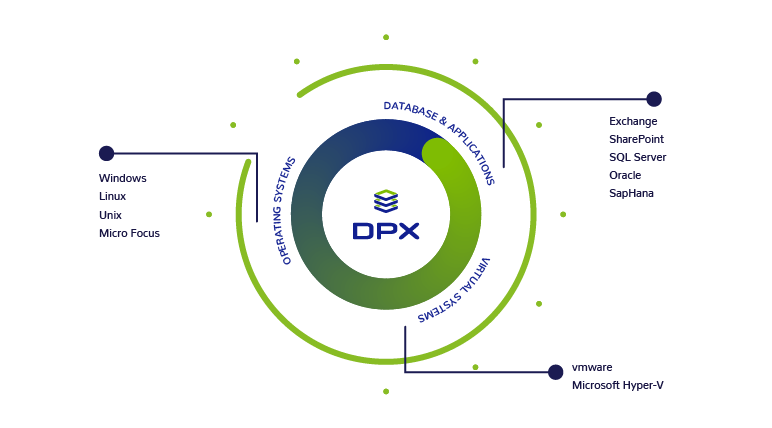
Cover virtual, physical, and application workloads under one protection strategy.
Catalogic DPX · Enterprise Backup and Recovery
New in this release: expanded virtualization coverage and recovery workflows.
See what’s new ↗From daily backups to a full system rebuild, DPX connects the protection job to the recovery task.
Cover virtual, physical, and application workloads under one protection strategy.

Recover a file, a virtual machine, or an entire physical system when needed.

Use storage options including Catalogic vStor, tape, and cloud destinations.

Need immutable backup storage? DPX vStor adds software-defined storage for protected backup copies.
Explore vStor ↗Find the task first, then drill into the details that matter to your environment.

01 / Everyday protection
Protect workloads across sites and storage systems with scheduled policies.
02 / Recovery operations
Match the recovery path to the incident, from individual files to a rebuilt server.

03 / Cyber resilience
Keep recoverable copies and clear restoration options when production is disrupted.
DPX 4.16 extends agentless protection to Proxmox and adds security, compliance, and recovery controls across VMware, vStor, and tape.

Protect Proxmox virtual machines without agents, with full and incremental backups to vStor and node management from the web UI.

Back up and restore VMware virtual machines protected with a Virtual Trusted Platform Module.

Capture a full audit trail of REST and system-level actions, with configurable retention, filtering, and CSV export.

Manage tape registration, import and export slots, and automated library scans entirely from the web console.
Read the release overview for the full list of changes, or see when a Proxmox estate needs more than Proxmox Backup Server alone.
See when multi-hypervisor estates, long retention, immutability, and central reporting call for Catalogic DPX 4.16 instead of Proxmox Backup Server alone.
Explore agentless Proxmox backup, vStor audit logging, VMware vTPM support, and expanded disaster recovery and tape library management.
DPX provides robust backup and recovery capabilities. Patented block-level protection reduces backup time and impact by 90%, for both physical and virtual servers. Files and applications are easily recovered directly from backup storage. The vStor backup repository is a flexible and scalable software-defined backup target that frees you from expensive backup appliances and vendor lock-in.
DPX GuardMode provides an additional layer of ransomware detection to backup teams by proactively monitoring for suspicious activity and encrypted files. When ransomware strikes, DPX provides a list of affected files to restore and multiple recovery points so you can spin the clock back to just before the infection happened. Backups are stored as immutable snapshots with offline, air-gapped copies.
DPX 4.16 adds agentless Proxmox VE backup to Catalogic's enterprise data protection platform, giving mixed VMware, Hyper-V, and Proxmox estates a single console for backup, recovery, and ransomware resilience.
DPX vStor product brief: software-defined immutable backup repository built on ZFS, included with every Catalogic DPX license at no extra cost.
DPX GuardMode product brief: ransomware and data anomaly detection built into your backup workflow, with real-time alerts and targeted recovery. Free with Catalogic DPX.
Catalogic's enterprise data protection solution offers broad platform compatibility with your network, servers, applications, and databases. For information on how to deploy DPX and for compatibility information, please see our documentation.
| Type | DPX Master or Device Server or DPX vStor Server | Client |
|---|---|---|
| Memory | 4 GB minimum, 8 GB recommended | 2 GB minimum, 4 GB recommended for Enterprise Applications |
| Processor | 2 Cores minimum | 1 Core minimum |
| Architecture | x64 required | Please refer to the latest Compatibility Guide |
| Disk Space | 5 GB minimum free space on system drive for installation, and 100 GB for catalog storage (direct attached or SAN) | 4 GB minimum free space on system drive for installation* |
| Operating System | Please refer to the latest Compatibility Guide | Please refer to the latest Compatibility Guide |
*Note: For Windows clients with limited disk space, a client-only installer is available, which requires only 1.2 GB of temporary free space on the system drive. For details and restrictions, see the DPX Deployment Guide.
The above recommended configuration can support an enterprise with up to 300 clients. Larger enterprises can be accommodated by introducing additional master servers. DPX performance is dependent on backup job configuration and scheduling. The above recommended configuration is able to support approximately 25 concurrent jobs, with each job backing up one client.
The master server may be virtualized; however, the specified resources must be reserved for the virtual machines serving in this capacity. Please consult your virtualization vendor (e.g., VMware, Microsoft) to review the supportability of tape libraries or tape drives by the guest OS where you plan to install the master server. For example, fiber channel tape devices are not supported by VMware ESX Server.
Since backup and restore performance is highly dependent on disk and network I/O, choice of storage subsystems, network infrastructure components, as well as applicable configuration parameters for each will determine actual performance within specific IT environments.

When confronted with the ransomware threat, the critical role of their investment in DPX became clear. The robust DPX system, featuring multiple authentication layers, remained untouched by the attack. Simultaneously, their data, preserved in immutable vStor snapshots, was immediately ready for recovery.

Assistant Director of IT Operations, Southern Utah University
“The configuration was simple, the support team quickly helped us through the usual startup glitches, and it works just as we had hoped. Scheduling backups has become a snap, and everything just works. We don't need to watch over it or restart jobs anymore.”
Talk to Catalogic
Show us the platforms and systems you need to protect. We’ll walk through a DPX recovery approach that fits your environment.
Request a demo ↗