


VMware migration pressure
Many organizations are evaluating Proxmox after VMware licensing and portfolio changes. Backup teams need a model that can protect both existing enterprise workloads and new Proxmox clusters.
Proxmox VE Backup

Proxmox VE backup programs usually need more than one method. Some workloads need application-aware backup inside the guest operating system. Other workloads need VM-level protection without deploying a backup client in every VM. DPX combines both approaches on one platform.
| Protection model | Use case | DPX approach |
|---|---|---|
| Agent-based backup | Critical applications, databases, file servers, Windows and Linux workloads, OS-level recovery | Install the DPX client in the VM and protect the workload as a supported guest system. |
| Agentless Proxmox backup | Broad VM-level coverage, operational recovery, reduced agent sprawl, cluster-level protection | Protect Proxmox VMs directly from the DPX web UI with agentless full and incremental backups to vStor — no in-guest agent required. |
| Hybrid protection | Mixed estates where some VMs need application depth and others need VM-level protection | Use agent-based DPX for critical workloads and agentless backup for broad VM coverage. |
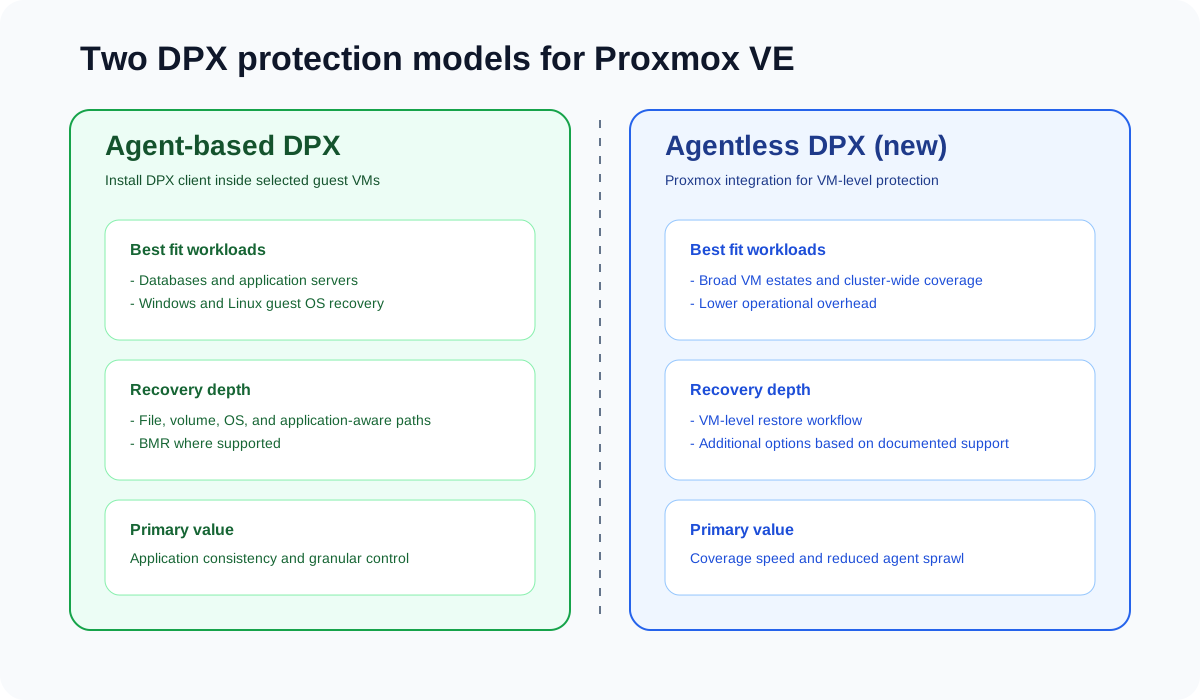
Proxmox VE gives organizations an open virtualization platform, but production data protection still needs centralized policy control, retention, tested recovery workflows, ransomware resilience, and support for mixed workloads.
Many organizations are evaluating Proxmox after VMware licensing and portfolio changes. Backup teams need a model that can protect both existing enterprise workloads and new Proxmox clusters.
Proxmox VMs often run Windows Server, Linux, databases, file services, and line-of-business applications. Some workloads require guest-level, application-aware backup.
Not every workload needs a backup client in every VM. Agentless VM-level protection can lower operational overhead for broad Proxmox backup coverage.
Proxmox supports LXC containers as well as VMs. Agentless Proxmox protection in DPX covers VMs. Check the DPX Compatibility Guide for LXC container support in each release.
Proxmox estates use local storage, ZFS, Ceph RBD, NFS, and mixed models. Backup design must match storage architecture and restore objectives.
Enterprise Proxmox backup strategy needs immutable storage, offsite copies, archive, clean recovery points, and tested runbooks.
DPX is the enterprise backup and recovery layer for Proxmox environments, combining agent-based protection with agentless Proxmox VM backup and restore.
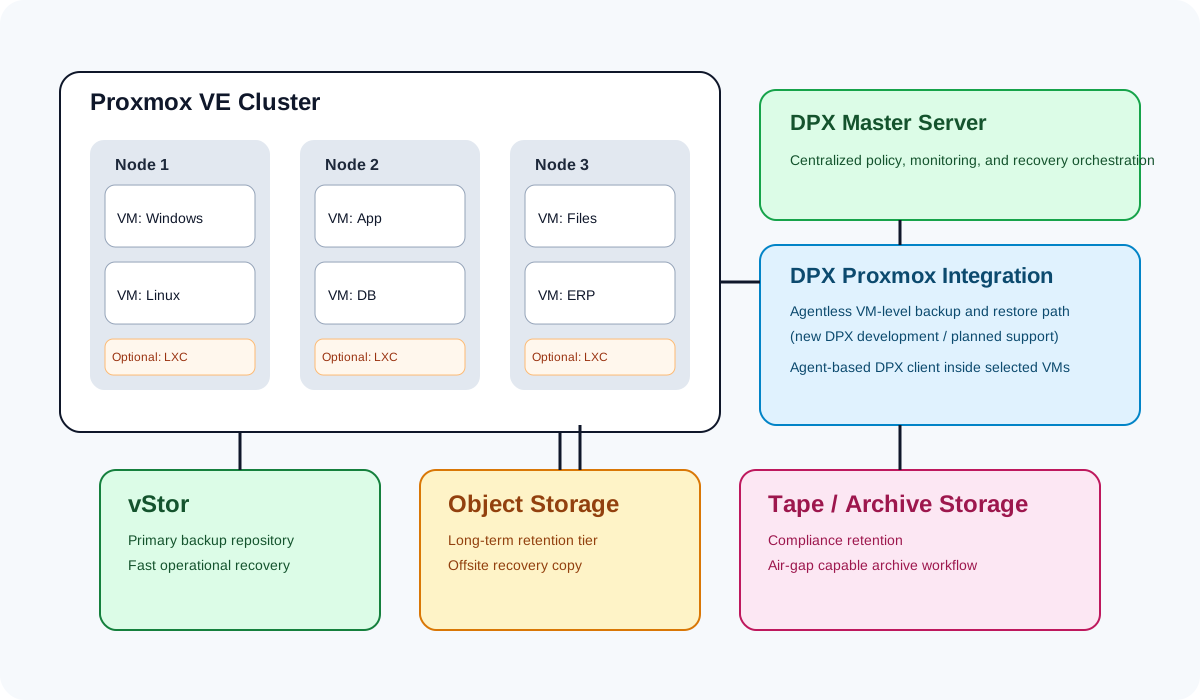
Agent-based DPX protection is the right model when workload recovery matters more than the hypervisor wrapper. Install the DPX client in supported Windows or Linux VMs running on Proxmox and protect operating systems, file systems, volumes, and supported applications according to the DPX Compatibility Guide.
Best-fit workloads
Key points

DPX includes agentless Proxmox VE protection, giving teams broad VM protection without installing a DPX client in every VM, with centralized policy management and lower operational overhead across Proxmox clusters.
Available in DPX 4.16
Agentless Proxmox capabilities

Agentless Proxmox backup is the default direction for operational VM protection when teams want centralized protection without deploying backup clients inside every VM.
Agent-based DPX backup remains the recommended choice for critical applications, databases, and systems where the recovery target is application, file system, volume, or OS, not only the VM object.
A Proxmox recovery strategy should not force every incident into a full VM restore. DPX should be aligned to recovery choice: file, volume, application, VM, or full system depending on the selected protection path.
Restore selected files from agent-based backups and, where documented, from agentless Proxmox VM backup workflows.
Use DPX block-level protection for supported guest operating systems when volume-level restore is required.
Use agent-based DPX for supported applications that need consistency and application-aware recovery workflows.
Use agentless Proxmox protection for full VM recovery, or agent-based DPX for guest-level restore.
Use BMR for supported guest operating systems and scenarios where full system rebuild is required.
Recover from longer-retention copies stored on tape, object storage, or other DPX-supported archive targets.
Proxmox environments are not all built the same way. Some use local ZFS, others use Ceph RBD or shared NFS, and many mix several storage models across clusters. DPX architecture planning should acknowledge this directly and map protection to the real storage design.
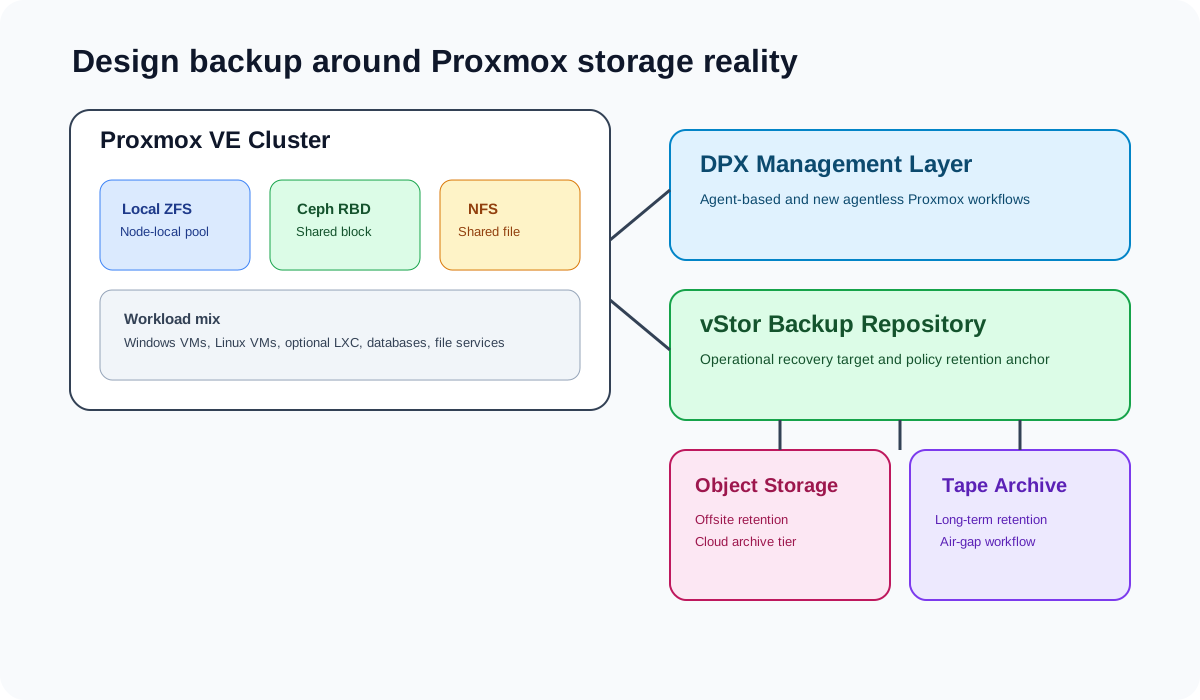
Use Catalogic vStor as the primary DPX backup repository for Proxmox protection. vStor anchors both agent-based recovery workflows and agentless Proxmox backup.
Proxmox adoption should not reduce ransomware recovery maturity. Use DPX with immutable storage, replicated copies, archive, and tested restore procedures so Proxmox workloads can be recovered after deletion, encryption, or infrastructure compromise.
DPX supports both agent-based and agentless protection models for Proxmox VE. Compatibility varies by guest OS, storage type, and Proxmox version — always confirm details in the DPX Compatibility Guide before designing production backup policy.
| Area | Support summary |
|---|---|
| Proxmox VE | Supported as a target platform for agentless VM backup and restore in DPX 4.16 and later |
| Proxmox VMs | Protect with agent-based DPX when guest OS is supported, or with agentless Proxmox backup for broad VM-level coverage |
| Windows guests | Protect with DPX client using file-level, block-level, and BMR features where supported |
| Linux guests | Protect with DPX client using supported Linux capabilities by distribution and version |
| Debian guests | DPX Block Data Protection is not currently available for Debian |
| LXC containers | Not yet supported by agentless Proxmox protection; check the DPX Compatibility Guide for current status |
| Ceph RBD | Common Proxmox storage architecture; confirm implementation-specific support in the DPX Compatibility Guide |
| vStor | DPX backup storage and recovery repository for Proxmox workloads |
| Agentless Proxmox | Available in DPX 4.16 for full and incremental VM backup and restore, backup scheduling, and node management from the web UI |
Always verify supported Proxmox VE versions, guest operating systems, storage types, backup modes, and restore options in the current DPX Compatibility Guide before designing production backup policy.
Install the DPX client in supported Windows or Linux VMs and protect applications, file systems, volumes, and operating systems with the right DPX backup type.
Use agentless Proxmox protection for general VM-level backup and recovery across your Proxmox version and storage design.
Use agentless coverage for broad VM protection and agent-based backup for databases and application servers needing deeper recovery.
Protect Proxmox workloads to vStor for centralized backup storage, operational recovery, replication, and archive workflows.
Use DPX to protect mixed hypervisor environments while teams evaluate or migrate workloads from VMware to Proxmox.
Use immutable vStor storage, replicated recovery points, offsite archive, and tested restore procedures for cyber recovery readiness.
The datasheet, the step-by-step guide, the documentation, and the honest comparison against Proxmox Backup Server.
The one-page technical summary of agentless and agent-based Proxmox protection with DPX.
Connect Proxmox VE, create an agentless backup job to vStor, and test a full VM restore.
The DPX documentation for Proxmox backup, including supported versions and configuration steps.
Where the built-in Proxmox Backup Server stops being enough, and what to weigh before adding to it.
See how DPX 4.16 adds agentless Proxmox backup and restore, vStor audit logging, VMware vTPM protection, expanded disaster recovery workflows, and simpler web-based operations.
· Kacper Wasiak
Comparing Commvault alternatives in 2026? See how DPX vs Commvault differ on licensing, ransomware detection, and Proxmox VE support.
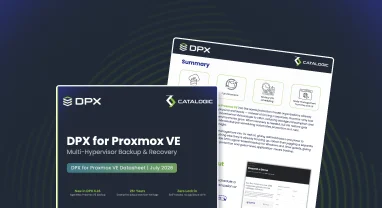
DPX 4.16 adds agentless Proxmox VE backup to Catalogic's enterprise data protection platform, giving mixed VMware, Hyper-V, and Proxmox estates a single console for backup, recovery, and ransomware resilience.
Use DPX to protect Proxmox workloads with agent-based backup for supported guest systems and agentless Proxmox protection for VM-level recovery.
Request a Demo