


Centralized management
Create and manage backup policies across file servers from the DPX management interface.
DPX File Backup

Unstructured file data keeps growing across departments, applications, users, and infrastructure platforms. It often lives outside databases and can be spread across physical servers, virtual machines, and mixed operating systems. When that data is deleted, corrupted, encrypted, or overwritten, recovery needs to be fast and specific. DPX helps backup teams protect file data with centralized policies, flexible backup scopes, and granular restore options. Instead of treating every recovery as a full server recovery, DPX lets administrators restore the files and folders that matter.

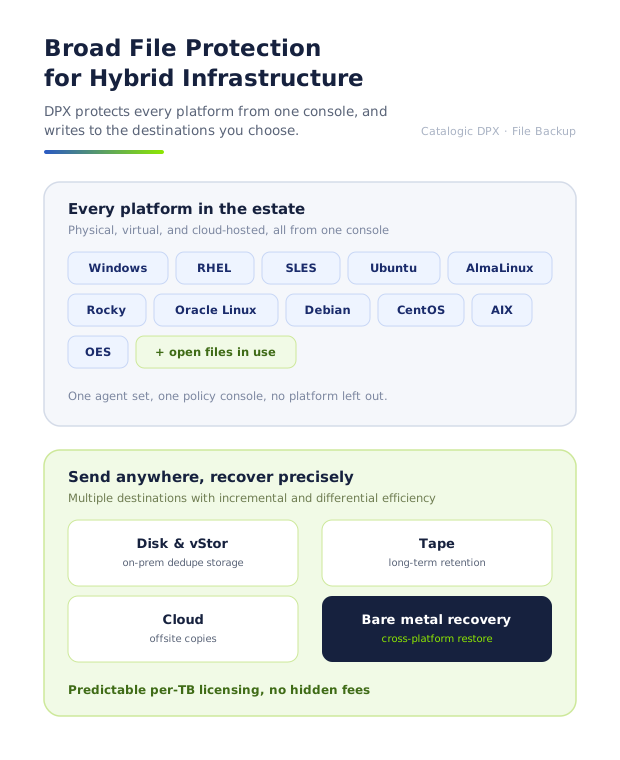
Protect file data across supported Windows, Linux, and OpenText OES environments with one enterprise backup platform. DPX is well suited for organizations that need to protect mixed infrastructure without creating isolated backup workflows for every file server type.
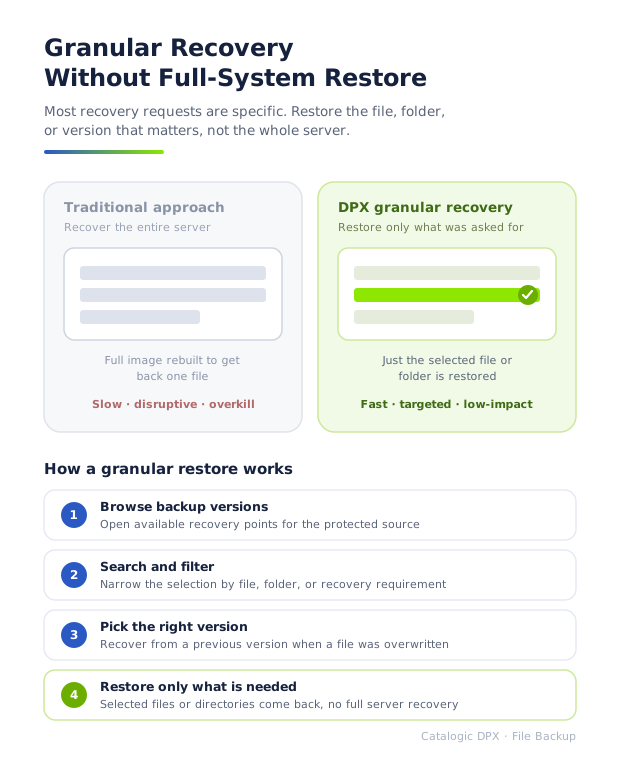
Most file recovery requests are specific: a user deleted a folder, a report needs to be restored to an earlier version, or a configuration file was overwritten. DPX lets administrators restore selected files and directories from available backup versions without recovering the entire server.
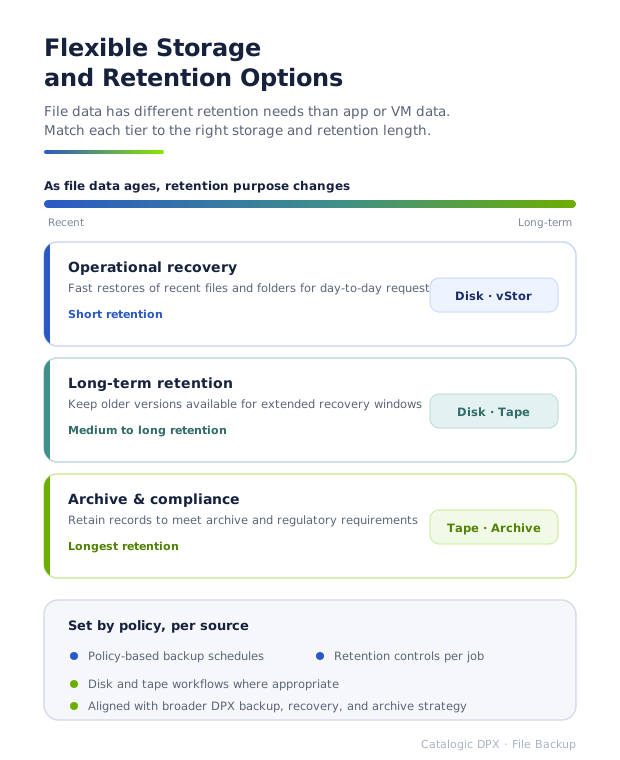
File data often has different retention requirements than application or VM data. DPX supports backup workflows that can align file protection with operational recovery, long-term retention, archive, and compliance needs.
DPX gives administrators the controls required to protect file data consistently, recover precisely, and reduce risk across business-critical file systems.
Create and manage backup policies across file servers from the DPX management interface.
Protect at the level that matches the requirement: node, disk, directory, or individual file.
Restore specific files and folders from available backup points instead of recovering more data than necessary.
Use backup options such as verification, compression, retry behavior, open-file handling, mounted-drive behavior, and pre/post scripts.
Use DPX backup with GuardMode ransomware detection to improve recovery decisions after suspicious file activity.
Use the DPX Compatibility Guide for exact operating system versions, feature support, and platform-specific notes.
Enterprise backup teams often manage a mix of legacy systems, current operating systems, business file shares, long-retention data, and ransomware recovery requirements. DPX gives those teams a consistent way to protect file-based workloads alongside broader backup and recovery operations. Copying files is only the start. File backup has to deliver recoverability, retention, platform coverage, operational control, and confidence that a specific file or folder can be restored when the business asks for it.
DPX File Backup protects data logically file by file. Administrators define the protected source, select the backup scope, configure job options, assign storage and retention, and restore selected files or directories when needed.
File servers are common ransomware targets because they contain shared data accessed by many users and applications. Backup gives teams a path to recovery, but recovery decisions improve when administrators understand which files changed and when suspicious behavior began. GuardMode adds file system monitoring and ransomware detection on Windows Server, RHEL, AlmaLinux, and OES 2023 hosts that run the GuardMode agent. It helps identify suspicious file activity so teams can make more informed recovery decisions and avoid restoring compromised data when cleaner recovery points are available.

Use these resources to validate platform support, understand DPX File Backup behavior, and plan ransomware-aware recovery workflows.
Learn how DPX File Backup works, including backup scope, job configuration, source options, destination options, and restore procedures.
Confirm supported platforms, operating system versions, feature coverage, and version-specific notes before designing a protection policy.
See how GuardMode adds file activity monitoring and ransomware detection to DPX environments.
Protect physical, virtual, and application workloads with DPX enterprise backup and restore.
Strengthen recovery workflows with ransomware detection, immutable storage, and clean recovery planning.
Use immutable backup storage to reduce the risk of backup data being altered or deleted by ransomware.
Protect OpenText OES file services with DPX file-level backup and granular recovery.
DPX gives backup teams precise file-level protection, granular restore, policy-based operations, and ransomware-aware recovery workflows for critical file data across supported enterprise environments.
Request Demo