Catalogic Software

DPX feature

Rapid Recovery

When systems go down, every minute counts. Catalogic DPX is a rapid recovery solution that brings virtual machines, files, applications, and entire systems back online in minutes – not hours – so your business keeps running.
Catalogic DPX rapid recovery solution

A rapid recovery solution built for real downtime

Backups exist for one reason: getting your data back fast when something fails. Catalogic DPX is a rapid recovery solution designed around that moment. Instead of waiting for a full restore to complete before work can resume, DPX lets you run workloads directly from backup storage and recover the exact data you need — a single file, a database, a virtual machine, or a whole server. Recovery becomes a quick, predictable operation rather than an all-day emergency.
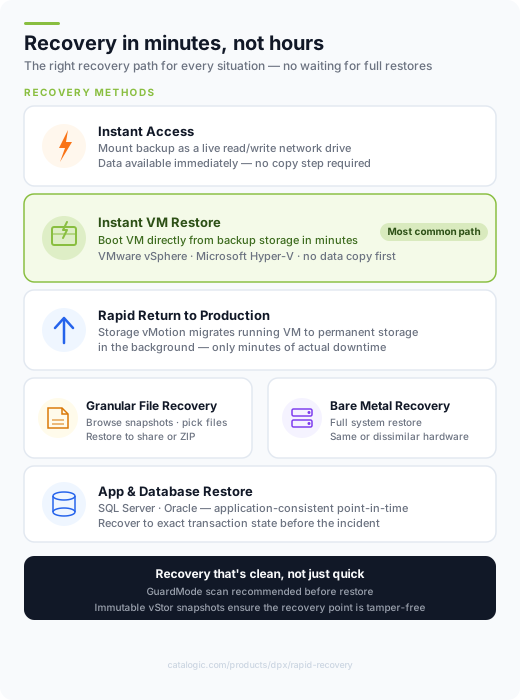
DPX rapid recovery options — Instant VM Restore, Instant Access, Granular Recovery, Bare Metal

Every way to recover, fast

DPX gives your team the right rapid recovery method for each situation, so downtime stays short whatever fails.

Instant Access recovery

Instant Access

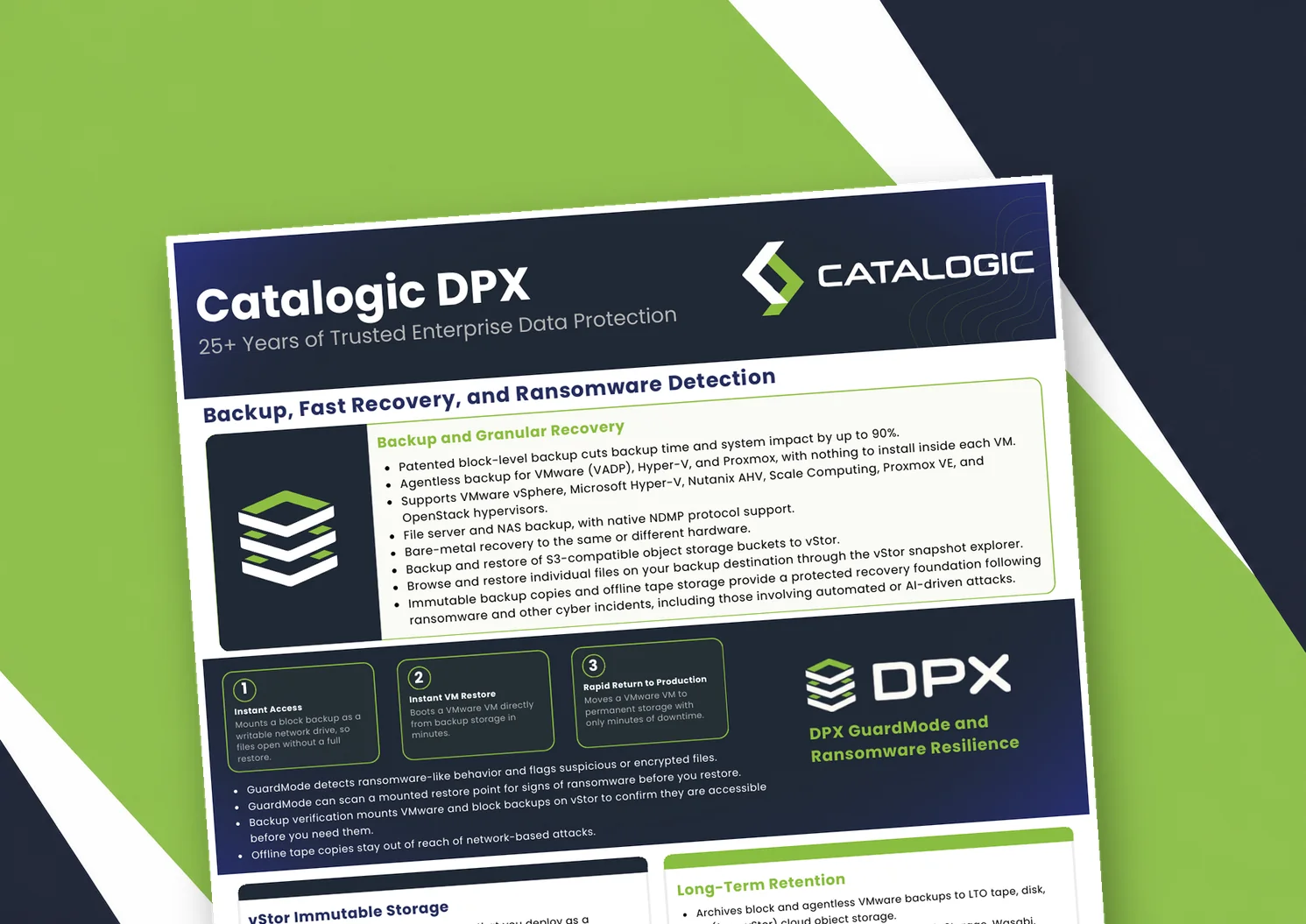
Mount a block backup as a writable network drive and put data straight into use — no waiting for a full restore to finish.

Instant VM restore

Instant VM Restore

Boot a virtual machine directly from backup storage and bring it back into service within minutes of an outage.

Rapid Return to Production

Rapid Return to Production

Promote a running recovery VM to permanent production storage in the background using Storage vMotion, with only minutes of downtime.

Granular file recovery

Granular file recovery

Restore individual files and folders from any recovery point without rebuilding an entire system.

Application and database restore

Application & database restore

Recover Microsoft SQL Server, Oracle, and other business-critical applications to a consistent point in time.

Bare metal recovery

Bare metal recovery

Rebuild full Windows and Linux systems to the same or dissimilar hardware after a hardware failure or attack.

Recover virtual machines in minutes

For VMware and Hyper-V environments, DPX turns VM recovery into a near-instant operation:

  • Instant VM Restore boots a virtual machine straight from backup storage, so users are back online while data is still being restored.
  • Rapid Return to Production (RRP) migrates that running VM to permanent storage in the background with Storage vMotion — typically just a few minutes of downtime.
  • Full VM restore returns VMware and Hyper-V machines to their original or a new location when you need a complete copy.
  • Recovery from replicated or alternate storage keeps you running even if a primary site is unavailable.
Rapid virtual machine recovery in DPX

vStor Snapshot Explorer: find and recover files fast

Sometimes you don't need a whole machine back — you need one file, right now. vStor Snapshot Explorer mounts the disk images inside your VMware agentless and bare metal recovery snapshots and presents them as a browsable file tree in the vStor web interface. Search through a point-in-time snapshot, select the files or folders you need, and restore them straight to an SMB/CIFS network share or download them as a ZIP — keeping the original folder structure or flattening it. Because recovery happens at the file level, there's no need to spin up a full system just to retrieve lost data.
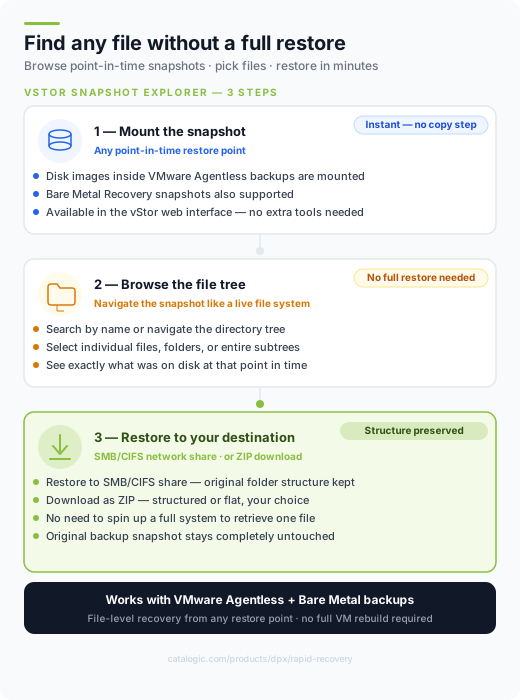
vStor Snapshot Explorer — browse and recover files from point-in-time snapshots

Instant Access for physical and block workloads

Instant Access makes block backups usable the moment you need them, with no lengthy copy step first:

  • A backup snapshot is mapped as a fully accessible read/write network drive on the target Windows or Linux node.
  • Data is available immediately for use, copying, or verification — while the original backup stays untouched.
  • Mount a recovery point to validate a restore, recover specific data, or stage an application before committing to a full restore.
  • Pair Instant Access with bare metal recovery to bring complete physical systems back when hardware fails.
Instant Access block recovery in DPX

Rapid recovery, even from disaster

Fast recovery shouldn’t stop at a single failed server. DPX recovers full Windows and Linux systems through bare metal recovery to the same or dissimilar hardware, and can restore from replicated or alternate storage when a primary site is down. Whether you lose a file, a VM, or an entire data center, the recovery path stays fast and predictable.

Recovery that's clean, not just quick

Speed only helps if you recover good data. DPX pairs rapid recovery with GuardMode ransomware detection and immutable vStor storage, and Snapshot Explorer recommends a GuardMode scan before you restore. So you can recover quickly and confidently – without reintroducing an infection. See cyber-resilient recovery.

Why teams choose DPX for rapid recovery

Minutes, not hours

Instant Access and Instant VM Restore run workloads directly from backup storage, so users are productive again while the full restore completes behind the scenes.

Recover only what you need

From a single file in Snapshot Explorer to a full bare metal rebuild, you choose the smallest, fastest recovery for the situation.

Fast and trustworthy

GuardMode scanning and immutable snapshots help ensure the recovery point you restore is clean and tamper-free.

Rapid recovery questions, answered

What makes DPX a rapid recovery solution?
DPX lets you run workloads directly from backup storage instead of waiting for a full restore. Instant Access mounts block backups as live network drives, and Instant VM Restore boots virtual machines straight from backup – so recovery takes minutes. Explore the platform.
How fast can I recover a virtual machine?
With Instant VM Restore you can boot a VM directly from backup storage within minutes. Rapid Return to Production then migrates it to permanent storage in the background using Storage vMotion, typically with only a few minutes of downtime.
Can I recover a single file without restoring the whole system?
Yes. vStor Snapshot Explorer mounts the contents of a backup snapshot as a browsable file tree, so you can pick individual files or folders and restore them to a network share or download them as a ZIP.
How does DPX keep rapid recovery safe from ransomware?
DPX combines GuardMode detection with immutable vStor snapshots, and recommends a GuardMode scan before restore so you recover a clean point in time. See cyber-resilient recovery.

Related DPX resources

Learn more about rapid recovery and data protection with Catalogic DPX.
Recover in minutes with DPX

See how Catalogic DPX restores VMs, files, applications, and full systems fast — and book a personalized rapid recovery demo with our team.

Request Demo