Tape backup remains a practical option for businesses keeping large volumes of data for years or maintaining an offline recovery copy. Hard drives make individual files easier to retrieve, while cloud storage puts a copy offsite without the work of transporting media. The right mix depends on how quickly you need to recover and what it costs to keep each copy for its full retention period.
Understanding the Basics of Tape Drives
Tape stores data sequentially on magnetic media. Linear Tape-Open (LTO) is a common format for business backup and archiving. LTO-9 holds 18 TB per cartridge natively; its advertised 45 TB compressed capacity assumes a 2.5:1 compression ratio. Already compressed or encrypted data may achieve little additional compression, so plan capacity around your actual data.
LTO-10 is the current generation, with 30 TB and 40 TB native cartridge capacities. A newer tape format does not automatically mean that your backup software or existing drive supports it. Check hardware and software compatibility before buying media or planning an upgrade.
Tape suits long retention periods and workloads that can tolerate the time needed to load and locate data. Recoverability over decades depends on storage conditions, media handling and continued access to a compatible drive and backup catalog. Follow the manufacturer’s LTO cartridge storage guidance, test restores regularly and plan media migration before older hardware becomes difficult to replace.
Why Businesses Still Use Tape Backup
Tape earns its place when the volume and retention period justify the equipment and operational work.
- Cost over a long retention period. Tape can offer a low media cost per terabyte for large archives. Compare the full cost of a drive or library, host interfaces, backup software, replacement media and offsite handling. Prices vary by generation and whether equipment is new or used; a small backup set may not justify that investment.
- Storage without continuous power. An ejected cartridge needs no power while stored. Keeping older copies on shelves can free online storage for recent backups and active work. Budget for suitable storage conditions and periodic recovery checks.
- An offline recovery copy. Ejected tapes stored away from the backup system are unreachable through its network connection. This reduces exposure to ransomware that can access online backups. Tapes loaded in a connected library are not automatically isolated. Protect media against loss or damage, and keep encryption keys available for recovery. CISA recommends offline, encrypted backups and regular recovery tests.
- Capacity added through media. Additional cartridges expand retained capacity without another disk enclosure for each batch of data. That benefit still depends on the library’s slots, available drive time and the work of rotating media.
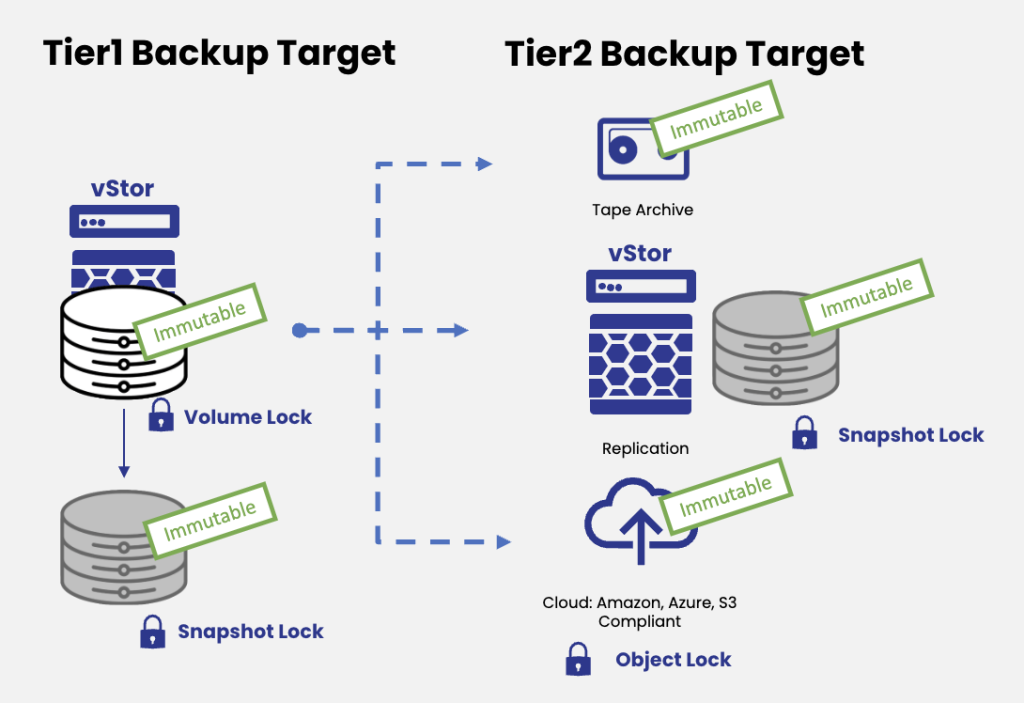
An offline copy and an immutable copy provide different protections. Standard rewritable tape is not inherently immutable; LTO write-once, read-many (WORM) media provides protection against overwriting recorded data. Storage locks shown in the diagram depend on the destination and its configuration.
The Drawbacks of Tape Drives
The biggest trade-offs involve equipment, recovery access and keeping an archive readable over time.
- Upfront costs and operational work. A tape system needs a compatible drive and connection, such as SAS or Fibre Channel. Larger installations may need a library. Include cleaning, maintenance, media inventory and offsite transport in the budget, along with the staff time to manage them.
- Time to start a restore. Tape must be loaded and positioned before reading the requested data. Retrieving a few files from an offsite cartridge can take much longer than accessing an online disk backup. Once streaming, tape can transfer large datasets quickly; seek time and media retrieval are separate from transfer speed.
- Generation compatibility. LTO-9 drives read and write LTO-8 and LTO-9 cartridges, not LTO-7. LTO-10 does not read or write earlier generations. Keep compatible readers available and plan migrations around the oldest tapes you must retain.
Where Hard Drives Fit in a Backup Plan
Disk storage suits recent backups and restores that need to start quickly. For a small business, an external drive can also be a straightforward way to create a separate copy, provided it is disconnected and stored safely after the backup.
- Faster access to individual files. HDDs can access data without loading a cartridge or winding tape to its position. This makes online disk backups useful for frequent restores. Restore performance still depends on the backup format and the system serving the data.
- Streaming speed depends on the hardware. HDDs are not universally faster at reading and writing. The LTO Program lists up to 400 MB/s native transfer speed for LTO-9. Actual throughput for tape or disk depends on the drive model, workload and whether the source system can sustain the transfer.
- A lower entry cost for smaller backup sets. A few external HDDs can be easier to budget for than a tape system. At larger scale, include the cost of enclosures, power and replacements, plus the capacity needed for all retained versions.
RAID helps maintain availability after a disk failure, but does not replace a separate backup. An online disk copy can still be exposed to compromised credentials or ransomware. Keep an additional copy isolated or protected by correctly configured immutability controls, and test that it can be restored.
The Role of Cloud Backup Solutions
Cloud storage provides an offsite destination without managing a second physical storage location. It reduces the need to buy storage hardware, but you still need backup software and a plan for recovering the data. Access controls and encryption must be configured correctly; provider redundancy does not replace independent backup copies.
Hot storage and archive tiers serve different recovery needs. Wasabi Hot Cloud Storage provides online object storage. Amazon S3 Glacier includes several classes: Glacier Instant Retrieval offers immediate object access, while Flexible Retrieval and Deep Archive require a retrieval step before downloading data. AWS documents standard retrieval times of several hours for those archive classes. Include that delay and the subsequent download in your recovery plan.
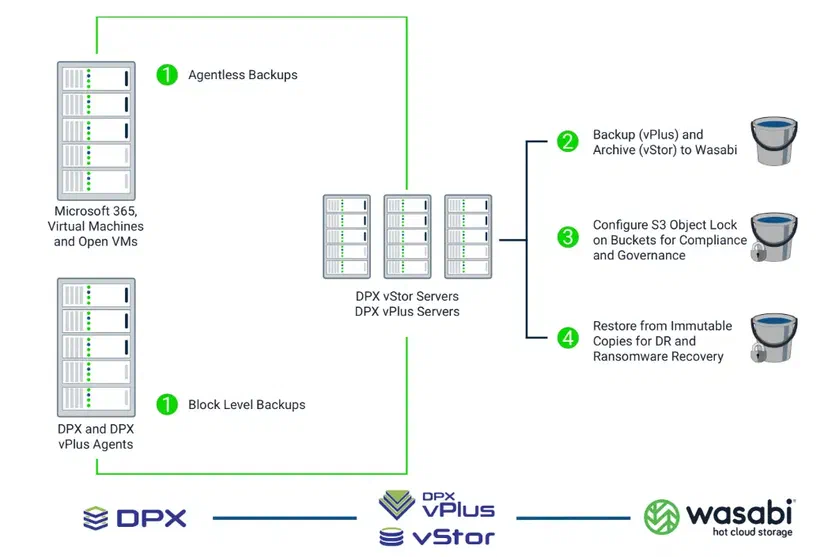
Cloud costs depend on the provider and storage class. Compare ongoing storage charges with retrieval and transfer fees, request charges and minimum retention periods. Wasabi does not charge egress or API request fees within its usage policies, and its standard Pay as You Go plan has a 90-day minimum storage duration. Deleting an object earlier still incurs charges for the remaining minimum period. Other plans and providers have different terms.
An offsite copy helps you recover after a local disaster. A full cloud restore also depends on your available bandwidth and any provider retrieval delay. Confirm where the data is stored, who can access or delete it, and how long a representative restore actually takes.
Comparing Tape, Disk and Cloud Backup
| Storage option | Best fit | Main trade-off |
|---|---|---|
| Tape | Large retained backup sets and offline copies | Drive investment, media handling and time to retrieve cartridges |
| Hard drives | Recent backups and frequent file restores | Online copies need protection; retained versions require disk capacity |
| Hot cloud storage | Offsite copies with immediate object access | Recurring charges and download bandwidth |
| Archive cloud storage | Long retention with infrequent access | Retrieval delays and fees vary by class |
For a closer look at retention costs and recovery requirements, see our tape versus cloud storage comparison.
Catalogic DPX: Over 25 Years of Expertise in Tape Backup Solutions
For over 25 years, Catalogic DPX has been a trusted name in backup solutions, with a particular emphasis on tape backup technology. Designed to meet the evolving needs of small and medium-sized businesses (SMBs), Catalogic DPX offers unmatched compatibility and support for a wide range of tape devices, from legacy systems to LTO-10 and IBM 3592 drives. This extensive experience allows businesses to seamlessly integrate both old and new hardware, ensuring continued access to critical data. The software’s robust features simplify tape management, reducing the complexity of handling multiple devices while minimizing troubleshooting efforts. With DPX, businesses can streamline their tape workflows, manage air-gapped copies for added security, and comply with data integrity regulations. Whether it’s NDMP backups, reducing backup times by up to 90%, or leveraging its patented block-level protection, Catalogic DPX provides a comprehensive, cost-effective solution to safeguard business data for the long term.
Explore Catalogic DPX and its long-term retention and archival options. The DPX tape storage documentation describes the tape setup and management workflow.
Choosing a Backup Mix for Your Business
Start with the systems you need to bring back first. Set a recovery time objective (RTO), the time allowed to restore service, and a recovery point objective (RPO), the amount of data loss you can tolerate measured in time. Then decide how long each backup must be retained and whether it needs to survive a site outage or a compromise of the production network.
- For urgent recovery, keep a recent copy on storage you can reach and restore from within your RTO. An online disk backup is a common choice, but validate it with a timed restore.
- For long retention, compare tape’s equipment and handling costs with the full cloud bill across the required retention period. Include the cost and time of retrieving the oldest copy.
- For protection against a site disaster, keep a copy at another location. Offsite tape and cloud storage both serve this purpose, with different recovery logistics.
- For ransomware recovery, maintain an offline or appropriately immutable copy with access separated from production systems. Recovery tests must include the catalog and any required encryption keys.
Many businesses use disk for recent recovery points and tape or cloud for an additional retained copy. Choose the mix that meets your recovery targets at a cost you can sustain, then test it before an outage makes those targets urgent.