A protected snapshot nobody can find during an incident is not a recovery capability. If you are designing immutable storage rather than reading about it, two decisions do most of the damage when they go wrong: what belongs where, and whether anyone has proven the restore runs. Both are answerable on paper, before a purchase order exists.
What should stay local, be replicated, or be archived?
Start from recovery intent, because each copy is doing a different job.
Recent data usually needs local recovery in minutes. Other recovery points need to exist somewhere else in case the site does not. Older data needs to be retained cheaply and will rarely be read. Treating all three the same is how organisations end up overspending on fast storage while the workloads that genuinely need rapid recovery sit on the same tier as everything else.
The practical step is mapping workloads into recovery tiers:
- Mission-critical virtual machines need local capacity, short restore paths, and protected snapshots.
- Remote office workloads usually want a small local repository plus replication to a central target.
- Long-retention data wants economical capacity and a retention policy, not speed. This is where long-term retention and archival and tape still earn their place.
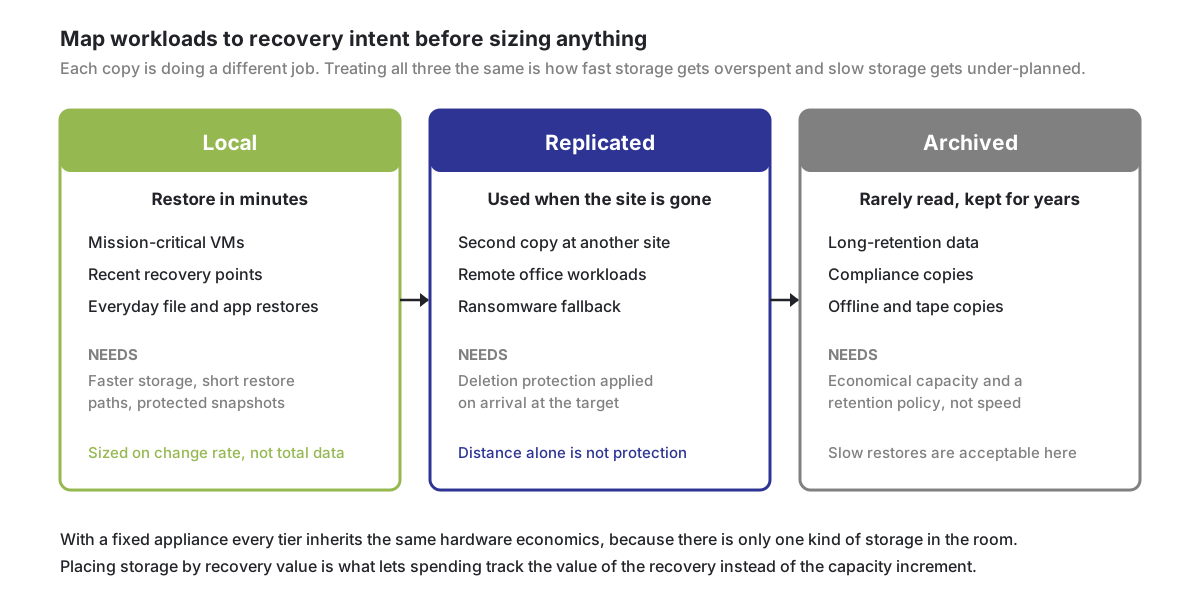
This is where a software-defined repository pays off. With a fixed appliance every tier tends to inherit the same hardware economics, because there is only one kind of storage in the room. Being able to place storage according to recovery value is what lets spending track the business value of the recovery rather than the capacity increment.
How will the team prove restore readiness?
Immutability has to be paired with operational readiness or it is decoration. A protected snapshot is worth something only if somebody can identify it, reach it, and restore from it inside the time the business has agreed.
The things worth testing are unglamorous. Can the team find the right recovery point without a storage administrator? Can they confirm the backup data is readable before committing to a restore? Can the workload owner validate the restored system, rather than IT declaring success because a job finished green?
For supported Block and VMware jobs written to vStor, DPX backup verification mounts the snapshot to check that backup data is accessible. When configured, GuardMode then scans the mounted copy for suspicious files and signs of encryption. These checks help assess a recovery point; they do not certify that every file is clean or replace testing the recovered application. Review the results and validate a restore with the workload owner.
Two deployment patterns
Primary repository. vStor is the main DPX backup destination. Jobs write there, and it provides the retention and restore services. This suits replacing a legacy target, avoiding an appliance purchase, or consolidating backup storage.
Sizing still needs discipline: front-end protected data, change rate, retention period, expected compression and deduplication behaviour, restore concurrency, and the performance profile of the underlying storage. A database-heavy environment behaves nothing like a set of repeated VM images, and a branch repository has different ingest and restore demands than a data centre one.
Protected replication target. vStor receives replicated backup data at a second site. This is what disaster recovery and ransomware response depend on, but only if the target copy is protected from the risks that reached the source. Configuring replication so uploaded snapshots receive deletion protection on arrival turns the target from a passive copy into a controlled recovery location.
The two combine well. A branch keeps local recovery points for everyday restores while replicating protected snapshots centrally. If the branch is unreachable, or its local backups are suspect, the replicated copy is already protected and ready.
Three worked scenarios
Replacing an appliance at end of support
A mid-sized organisation has a backup appliance approaching end of support. It still works, but capacity is tight, ransomware requirements have moved on, and the replacement quote bundles hardware, storage, maintenance and expansion into one large number. The backup team wants better recovery assurance; finance sees an infrastructure refresh.
Separating the requirements is what unlocks this. Local recovery speed, capacity growth, protection controls, replication and storage reuse are five different decisions that the appliance quote had merged into one. A software-defined repository lets them be priced and sized independently, on new general-purpose hardware, on suitable existing storage, or a mix.
The result is a more defensible purchase, because the spend maps onto stated resilience outcomes rather than onto a hardware lifecycle. That is a better conversation to have with a CFO or a cyber insurer.
Testing a ransomware recovery
Security asks the backup team to prove a critical application can be restored from a protected recovery point. A test worth running verifies four things: the recovery point still exists, it is still protected from deletion, its data is readable, and the restore procedure is clear enough to follow under pressure.
Protected snapshots cover preservation. DPX jobs and catalogs show what was protected and when. Backup verification confirms readability. GuardMode adds the ransomware context when encrypted or suspicious files are part of the scenario.
What the exercise should actually measure is how long it took to identify the correct recovery point, whether it was local or replicated, which protection mode applied, who is able to change protection settings, and whether the application owner could validate the result. Those numbers are worth considerably more than an appliance checkbox, and they expose gaps while it is still a drill.
Keeping options open during a platform migration
Virtualization strategy is unsettled. Teams are evaluating VMware alternatives, expanding Hyper-V, adopting Nutanix AHV or Proxmox, and putting compact platforms at the edge. During any of these transitions the backup team is asked to protect the old platform and the new one simultaneously.
The repository should support that rather than quietly constrain it. Backup storage that is software-defined rather than tied to a platform assumption lets immutable storage stay a fixed point while the compute layer moves underneath it. The migration is then an infrastructure decision rather than a backup problem.
Validating the plan
What is immutable storage covers the mechanism, and immutable storage without appliance lock-in covers the cost case. For sizing against a real environment, request a demo. The assumptions above are worth validating against your own change rate and retention before anything is ordered.

Pawel Staniec
CTO
Pawel is CTO at Catalogic Software, where he owns DPX product architecture and technology direction and works with our developers, alliance partners and customers across EMEA to keep what we build aligned with how our data protection products are actually deployed. He writes about the engineering behind our releases, including NDMP backup management, Proxmox VE protection, and where hypervisor-native backup tooling stops being enough.