Bare metal recovery (BMR) is the process of restoring a complete computer system onto a machine that has no operating system installed. One BMR restore brings back the operating system, applications, configuration, and data together from a single system-level backup image, so nobody has to install Windows or Linux first and then layer the data back on afterwards.
What is bare metal recovery (BMR)?
The name describes the state of the target. Bare metal is hardware with nothing on it, no operating system, no drivers, no middleware. A wiped server counts. So does a freshly created virtual machine, which is why BMR is just as relevant to virtualized estates as it is to physical ones.
What separates BMR from an ordinary restore is scope. A conventional backup product hands back files, folders, mailboxes, or database objects, and it assumes there is already a working system underneath to hand them back to. BMR makes no such assumption. It writes the whole machine, boot records and partition tables included, onto empty disks.
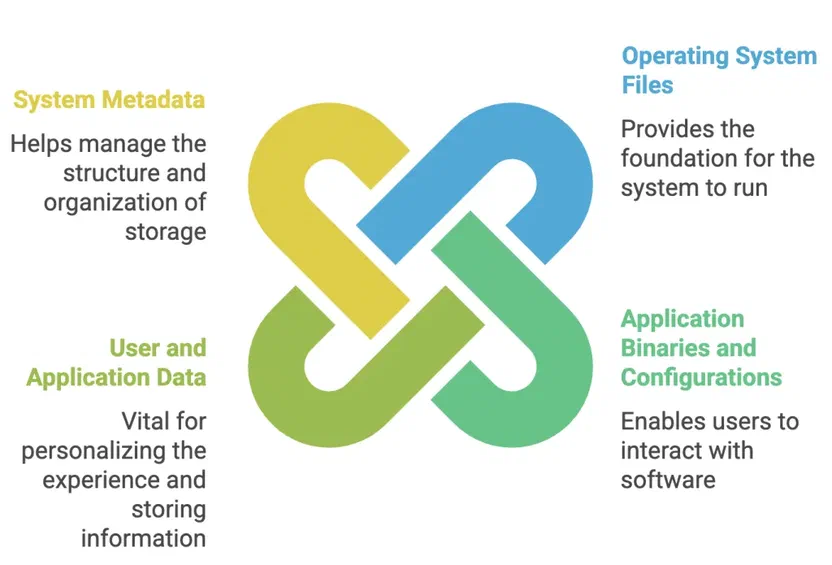
The backup that makes this possible has to be taken at the block or volume level rather than the file level, because a file-level copy of C:\Windows is not a bootable operating system. A system-level image captures:
- Operating system files and the registry or system configuration
- Boot records, partition tables, and disk layout metadata
- Application binaries and their configuration
- User and application data
You will also see BMR called bare metal restore. The two terms mean the same thing and vendors use them interchangeably.
Bare metal recovery vs. file restore vs. image backup
These three get conflated constantly, partly because the boundaries really are fuzzy and partly because vendors market them as though they were competing products. They are not. Two of them are restore methods, and one of them is a backup method that enables the others.
| File restore | Image backup | Bare metal recovery | |
|---|---|---|---|
| What it is | A restore method | A backup method | A restore method |
| What it hands back | Selected files, folders, or application objects | Nothing on its own, it is the source image | An entire bootable machine |
| Needs a working OS on the target? | Yes | Not applicable | No |
| Typical use | Deleted file, corrupted document, single mailbox | Feeds both granular and full-system restores | Dead hardware, wrecked OS, ransomware rebuild |
| Typical duration | Seconds to minutes | Runs on a schedule | Tens of minutes to hours, sized by the image |
The distinction worth holding onto is that image backup is what you capture and bare metal recovery is one of the things you can do with it. A good image backup supports both restore paths: mount it for granular recovery of a single file, or boot recovery media and write the whole thing back to bare hardware. If a product only offers file-level backup, BMR is off the table entirely, because the source material to rebuild a bootable system was never captured.
Against file restore, the decision is about blast radius. Somebody deleted a spreadsheet, so you do a file restore. The RAID controller took the array with it, so you do a BMR. Reaching for BMR when a file restore would do means overwriting a machine that was mostly fine, and that is a much longer outage than the problem warranted.
Why bare metal recovery matters
The cost of downtime gets quoted a lot, usually via a Gartner figure of $5,600 per minute. That number dates from 2014 and averages across wildly different businesses, so treat it as an order of magnitude rather than a budget line. The underlying point survives the caveat. Rebuilding a production server by hand takes a day or more once you count OS installation, patching, application setup, configuration, and the inevitable arguments about which settings the previous admin changed and never documented.
BMR compresses that into a single restore operation. It also removes an entire category of mistakes. A hand-rebuilt server is a new server that resembles the old one, and the gap between resembles and matches is where post-recovery incidents live. A restored image is the old server.
For ransomware specifically, BMR paired with immutable backup storage gives you a rebuild from a known-clean point in time rather than an attempt to clean a compromised machine in place, which is rarely worth trusting.
How bare metal recovery works
The mechanics are broadly the same across vendors:
- Boot media preparation. The backup software produces a bootable ISO that you write to a CD or USB drive. This carries a minimal recovery environment plus the drivers needed to see storage and network hardware.
- Target preparation. A new or wiped machine, with disks at least as large as the originals. Most products want some headroom.
- Boot from recovery media. The machine starts into the recovery environment instead of an installed OS, and the restore wizard launches.
- Connect to the backup repository. You give the recovery environment an address and credentials for the storage holding the backups.
- Select the recovery point. Pick the machine, the job, the volume, and the snapshot that matches what you are trying to get back to.
- Restore the image. The recovery environment writes the volumes onto the target disks, boot records included.
- Reboot. The machine restarts into the restored system.
Step 5 is the one that decides whether the recovery succeeds in any sense that matters. Restoring the most recent snapshot is the reflex, and after a ransomware incident it is often the wrong snapshot, because the most recent one may well contain the encryption. Knowing which recovery points predate the compromise is a detection problem, not a restore problem, which is why BMR belongs next to something that flags suspicious activity against the backup set.
When to use BMR
- Disaster recovery. Hardware failure, cyberattack, flood, fire. The machine is gone and something has to take its place.
- Hardware refresh. Moving a long-lived server onto new kit without reinstalling and reconfiguring it from scratch.
- Physical to virtual migration. Restoring a physical server’s image into a VM, which is often the fastest route off ageing hardware.
- Test and lab environments. Standing up a faithful replica of production to test a patch or train staff against.
- Specialized physical systems. Manufacturing, energy, and healthcare run equipment on machines with software that is difficult or impossible to reinstall, sometimes because the vendor no longer exists. Restoring the image is the only realistic recovery path.
That last case is the one people underestimate. A control workstation running a decade-old application with a licence tied to hardware is not something anyone is rebuilding by hand at 3am.
What BMR gives you
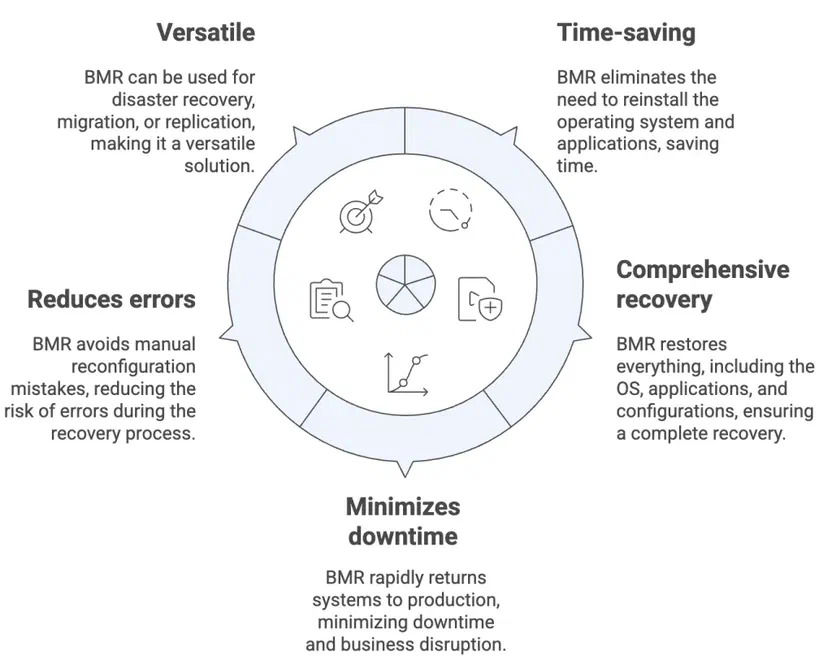
- Fewer steps. No OS installation, no patch cycle, no application reinstallation before the data can go back.
- Fidelity. The restored system matches its state at backup time, including the configuration nobody wrote down.
- Shorter outages. Hours instead of days for a full server rebuild.
- Fewer human errors. Manual reconfiguration is where recovery introduces new problems.
- A migration path. The same image that recovers a failed server can move a working one to different hardware or into a hypervisor.
Where BMR gets difficult
- Hardware similarity. Restoring to identical hardware is the easy case. Dissimilar hardware works, but storage and network drivers may not come up automatically, and it needs testing before you rely on it.
- Image size. Block-level images are considerably larger than file-level backups, which has consequences for both storage capacity and restore windows.
- Network throughput. Writing a large image across a constrained link sets a floor on your recovery time that no amount of software tuning will lift.
- Licence reactivation. Some applications tie licences to hardware identifiers and will need reactivating after a restore to different kit.
- Special cases. Domain controllers, clustered systems, and software RAID configurations tend to carry extra requirements or fall outside supported BMR entirely, so check the specifics before assuming coverage.
None of these are reasons to skip BMR. They are reasons to test it on a machine you can afford to break, well before you need it on one you cannot.
How bare metal recovery has changed
- Recovery into virtual machines. Treating a hypervisor as a legitimate BMR target, rather than insisting on matching physical hardware, removed the hardest constraint the technique had.
- Cloud targets. Restoring system images into cloud infrastructure underpins a good deal of what gets sold as DRaaS.
- Immutable repositories. Storing system images where they cannot be altered or deleted for a set period, which is what gives BMR its credibility as a ransomware answer.
- Orchestration. Driving BMR across many systems in a defined order, so recovering an environment does not mean an operator working through machines one at a time.
How Catalogic DPX does bare metal recovery
Catalogic DPX implements BMR as a disk-based disaster recovery feature that restores an entire system environment, covering the operating system, data, and application data for Exchange, SQL Server, and Oracle. The full mechanics are in the Bare Metal Recovery documentation, and the DPX Bare Metal Recovery product page covers how it fits the rest of the platform.
What it is built on
DPX BMR runs on Block backup. Regular Block backups of each protected node must include a special BMR volume, which tells DPX to capture the system and boot volumes along with the other critical resources the machine needs to start. Without that volume in the backup selection, the recovery point exists but will not produce a bootable system.
Backups land on a storage system, either Catalogic vStor or NetApp ONTAP, and the recovery environment connects back to that storage directly.
The restore
Recovery starts from an ISO written to a CD or flash drive. Boot the target from it, and the DPX Bare Metal Recovery wizard launches on its own. From there you supply the IP address and credentials for the vStor or NetApp system, then work through the volume, node, job, and snapshot you want. DPX writes the image, and a confirmation prompt reboots the machine into the recovered system.
Two requirements are worth knowing in advance. The documentation asks for a target disk 10% larger than the one being restored, and the standard procedure assumes hardware identical to the original. Recovery to dissimilar machines is supported for both Windows and Linux, with the caveat that Catalogic recommends careful advance testing in your own environment. Most network, SCSI, and hardware drivers ship on the recovery media, though a vendor-specific driver is occasionally needed, supplied as an .INF or .SYS file.
Restoring to a VMware VM works, and the controller has to match what the guest expects: LSI Logic Parallel for Windows 2003, LSI Logic SAS for Windows 2008 and later. On Linux, the source node needs at least 2 GB of memory, and software RAID or fake RAID configurations are not supported. Check the DPX Compatibility Matrix for the operating systems, file systems, and applications covered by your version before you build a recovery plan around BMR.
Where it fits the rest of DPX
Full-system recovery is worth more when the recovery point behind it is protected. DPX pairs BMR with immutable vStor snapshots, GuardMode ransomware detection, and replication to a second site, so the image you restore from is both available and trustworthy. For incident scenarios, the cyber-resilient recovery approach covers how to pick a recovery point you can actually rely on.
Bare metal recovery FAQ
What does bare metal recovery mean?
Bare metal recovery means restoring a complete system, including its operating system, applications, settings, and data, onto a machine with no software installed. “Bare metal” refers to that empty target, whether it is a physical server or a newly created virtual machine.
What is the definition of a bare metal restore?
A bare metal restore is a single restore operation that writes a full system image, boot records and disk layout included, onto empty disks and produces a bootable machine. It is the same thing as bare metal recovery; the terms are used interchangeably.
What is the difference between bare metal recovery and a file restore?
A file restore hands back selected files or application objects onto a system that already boots and runs. Bare metal recovery rebuilds the machine itself and needs nothing on the target beforehand. Use a file restore for deleted or corrupted data, and BMR when the operating system or the hardware is the thing that failed.
Is bare metal recovery the same as image backup?
No, though they depend on each other. Image backup is how the data is captured, at the block or volume level, in a form that includes everything needed to boot. Bare metal recovery is one of the things you can do with that image. You can also mount an image backup to retrieve individual files, so the image supports both restore paths while BMR is only one of them.
Can you do a bare metal restore to different hardware?
Yes. Restores to dissimilar hardware are supported by DPX for Windows and Linux, but drivers for storage, network, and video may not load automatically on unfamiliar kit, and machines occasionally need a boot repair afterwards. Test the specific source-to-target combination before you count on it in a recovery plan.
Can bare metal recovery restore to a virtual machine?
Yes. Restoring a physical machine’s image into a VM is a supported DPX scenario and a common migration route off ageing hardware. For VMware targets, the virtual SCSI controller has to match what the guest operating system expects.
How long does a bare metal recovery take?
The restore itself is bounded by image size and how fast you can move it, so it typically runs from tens of minutes to several hours. That is still substantially less than a manual rebuild, which takes a day or more once patching and application configuration are counted.
Does bare metal recovery help against ransomware?
It does, provided the recovery point is clean and cannot be tampered with. BMR rebuilds a compromised machine from a point in time before the attack rather than attempting to disinfect it in place. That depends on immutable backup storage to keep the image intact and on detection that tells you which recovery points predate the compromise.
Where to go next
Bare metal recovery answers a narrow question, which is what you do when the machine itself is gone rather than the data on it. Physical servers, application hosts carrying configuration nobody documented, and industrial systems running software that cannot be reinstalled all sit squarely in that category, and a file-level backup alone leaves every one of them exposed.
If you are working out where BMR fits your recovery plan, the DPX Bare Metal Recovery page has the planning checklist and support details, and a demo will walk through the restore workflow against a real environment.