The clock is running on Backup Exec. New license sales stopped on March 31, 2026, and full product support is scheduled to end on April 30, 2029, according to the published End of Support Life records. Arctera, which took Backup Exec over from Veritas and is now part of Cloud Software Group, announced both dates. For any organization still running Backup Exec, that date will eventually decide what backup software sits in the environment, whether anyone chose it or not.
Backup Exec has protected data reliably for a long time, and its place in its vendor’s product lifecycle is now a fact to plan around. The open questions are whether to stay on Backup Exec, when to reevaluate the platform, and which alternatives are worth a look. This guide covers what the timeline means in practice and how Catalogic DPX compares.
Backup Exec’s End of Life Is Now Official
“End of life” gets used loosely, so it helps to separate what has already happened from what is still ahead. The end-of-sale date passed on March 31, 2026, when Arctera stopped selling new licenses. The date that matters more is April 30, 2029, when full support ends. After that there are no more security patches, no compatibility updates for new operating systems, hypervisors, or applications, and no break-fix support from the vendor.
Backup Exec keeps running between now and 2029, which makes the deadline easy to underestimate, because nothing breaks on day one. Until 2029 the software falls a little further behind the platforms it protects each year, and after 2029 it runs with no vendor support at all.
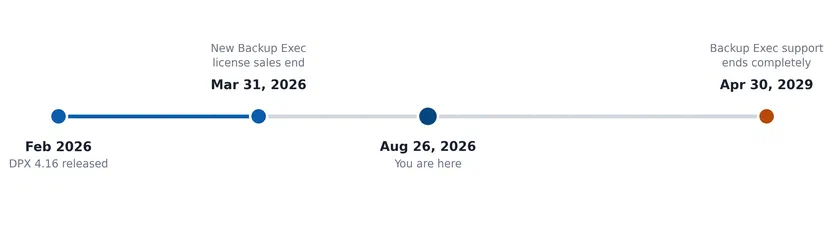
Backup Exec’s published end-of-sale and end-of-support dates.
If you are unsure how much runway that leaves your environment, the Backup Exec to DPX compatibility assessment gives a concrete answer in about a minute.
Why Standing Still Has a Cost
Staying put feels like the safe choice. In practice it is a bet that nothing forces the migration before the organization is ready, and three pressures tend to win that bet:
- Security exposure. Backup software sits close to the most sensitive data in an environment and is a direct ransomware target in its own right. Once patches stop, every newly discovered vulnerability in Backup Exec stays open.
- Compliance and audit findings. Frameworks such as SOC 2, HIPAA, and PCI DSS expect production systems, backup infrastructure included, to run on vendor-supported software. Auditors and cyber-insurance underwriters routinely ask about a backup platform’s support status, and “end of life, but still running” is a weak answer.
- The cost of downtime. New Relic’s 2025 Observability Forecast put the median cost of high-impact outages at roughly $2 million per hour among the more than 1,700 IT and engineering leaders it surveyed. A given environment may not see numbers that large, but an unsupported, unpatched backup platform is a worse foundation when something goes wrong.
Standing still does not cancel the migration. It hands the timing to whatever eventually forces the issue, whether that is an audit, an outage, or the 2029 deadline itself.
What to Look For in a Replacement
Fixing the evaluation criteria before looking at any specific product keeps the comparison focused on outcomes instead of feature checklists. Five questions tend to matter most:
- Workload parity. Does it protect what the environment runs today: VMware or Hyper-V virtual machines, physical Windows and Linux servers, and applications such as SQL Server, Exchange, Oracle, and SharePoint?
- Recovery speed and granularity. Can a team recover a single file, a single mailbox item, or an entire VM in the time the business needs?
- Ransomware resilience at the backup layer. Is protection built into the backup data and backup infrastructure, or added later as a separate step?
- Storage economics. Does the platform require a proprietary appliance, or can it run on infrastructure and storage already in place?
- Migration effort and lock-in. How much of the move is one-time work, and how much flexibility remains afterward?
Catalogic DPX has been in the data protection market for more than 25 years and is one option worth running through this checklist. Its feature set maps closely to a typical Backup Exec environment, which makes it a reasonable starting point.
DPX vs Backup Exec, Capability by Capability
To keep this concrete, we mapped Backup Exec’s published feature set category by category against Catalogic DPX, using the same checklist as Catalogic’s self-serve compatibility assessment. Mid-market Backup Exec deployments most commonly use a core set of capabilities: VMware, physical Windows and Linux servers, SQL Server, Exchange, Oracle, instant VM recovery, deduplicated storage, tape, and a few others. The assessment’s “Select a typical environment” preset bundles that set, 18 capabilities in total, and it scores 100%, with all 18 covered and no partial matches or gaps.
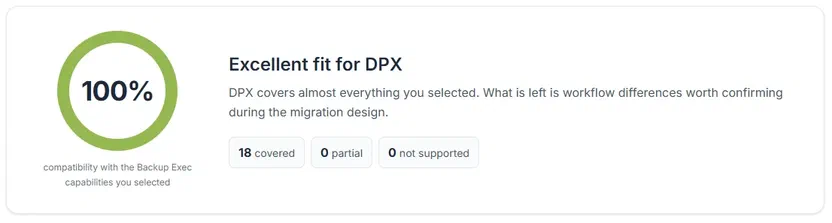
Compatibility score for a typical mid-market Backup Exec deployment. Covered items get full credit, partial matches 60%, and gaps none.
That is the pattern in the deployments we see most often. Widen the scope to the complete 29-item checklist, including capabilities few Backup Exec shops run, such as IBM AIX and Oracle Solaris backup, and the score drops to 88% with one named gap. The breakdown below reflects that fuller, worst-case checklist rather than the representative 18-item set.
Fully covered capabilities
Across the full 29-item checklist, DPX covers 22 capabilities outright, and 6 more are achievable through a different approach. The table below lists the capabilities DPX covers outright. Native Microsoft 365 or SaaS backup is the one capability with no current DPX equivalent. IBM AIX and Oracle Solaris backup works through a Linux-agent NFS mount rather than a dedicated agent.
| Category | Backup Exec capability | DPX status | What it means |
|---|---|---|---|
| Virtualization and servers | VMware vSphere / ESXi backup | Covered | Agentless VM backup, incremental, full VM recovery. |
| Virtualization and servers | Physical Windows server backup | Covered | Windows file and block-level protection. |
| Virtualization and servers | Microsoft Hyper-V backup | Covered | Hyper-V VM protection and recovery. |
| Virtualization and servers | Physical Linux server backup | Covered | Linux file and block-level protection. |
| Applications and SaaS | Microsoft SQL Server | Covered | Standalone and clustered configurations supported. |
| Applications and SaaS | Microsoft Exchange Server | Covered | Includes DAG configurations. |
| Applications and SaaS | Microsoft SharePoint Server | Covered | SharePoint application protection. |
| Applications and SaaS | Oracle Database | Covered | Standalone instances; RAC through file-level RMAN. |
| Backup and recovery | Incremental and forever-incremental backup | Covered | Incremental backup across DPX’s major protection types. |
| Backup and recovery | Granular file recovery from VM backups | Covered | Granular file recovery from VMware and block backups via vStor Snapshot Explorer. |
| Backup and recovery | Instant VM recovery | Covered | Rapid VMware recovery workflows. |
| Backup and recovery | Windows bare-metal recovery (SDR) | Covered | Full Windows server recovery (BMR/SDR equivalent). |
| Backup and recovery | Physical-to-virtual conversion | Covered | Covered through virtualization and bare-metal recovery workflows. |
| Backup and recovery | VM recovery validation (Recovery Ready) | Covered | Backup verification validates recoverability. |
| Storage and media | Disk backup target | Covered | DiskDirectory and vStor-based backup targets. |
| Storage and media | Deduplicated backup storage | Covered | Built into the integrated vStor repository. |
| Storage and media | Tape drives and tape libraries | Covered | Tape and expanded library management supported. |
| Storage and media | NDMP NAS backup | Covered | NDMP backup supported. |
| Storage and media | S3-compatible cloud object storage | Covered | S3-compatible cloud archive workflows. |
| Storage and media | WORM and immutable backup copies | Covered | Immutable vStor snapshots, plus offline tape copies. |
| Security and operations | Central monitoring and reporting | Covered | Centralized jobs, events, and reporting. |
| Security and operations | Retention and lifecycle management | Covered | Retention policies and archive/offload workflows. |
These figures describe the full Backup Exec feature list. Coverage for a specific environment depends on which of these capabilities it uses, and the compatibility assessment runs the same checklist against your selections and lists any gaps directly.
Where DPX Goes Further
Feature parity covers only part of the picture. Several DPX capabilities go beyond what Backup Exec offers, and each one answers a shift already under way in most backup environments. Ransomware groups now target backup infrastructure directly, which raises the stakes for detection and immutability inside the backup layer. Linux runs a growing share of the typical server estate, and a backup platform built mainly around Windows can leave it short on recovery options. Organizations reassessing their hypervisor strategy, whether to reduce exposure to VMware licensing or to add Proxmox VE, need a backup platform that is independent of any single hypervisor vendor’s roadmap. Eight capabilities map to those shifts: the vStor repository underneath, plus seven gains built on top of it.
| DPX capability | Why it matters |
|---|---|
| Integrated vStor backup repository | The foundation for deduplication, immutable snapshots, backup verification, GuardMode ransomware protection, replication and archive workflows, and recovery from replicated or offloaded backup copies. |
| Native Proxmox VE backup and restore | Full and incremental Proxmox VM backup to vStor, plus full VM restore. |
| Linux bare-metal recovery | Sits alongside Windows BMR. Backup Exec’s SDR is Windows-only. |
| Linux block-level protection | Protects Linux systems at block level, in addition to traditional file-level agent workflows. |
| Ransomware behavior detection with GuardMode | Watches for suspicious file activity and encryption behavior as it happens, in addition to scanning mounted vStor snapshots before a restore. |
| Immutability on the integrated repository | DPX holds block and agentless backups immutable directly on vStor, without a separate WORM appliance. |
| Recovery from replicated or offloaded vStor volumes | Disaster-recovery workflows recover from alternate vStor volumes when the original backup-volume mapping is no longer available. |
| Multi-VM disaster-recovery workflows | Coordinates recovery across several VMware VMs at once, including from replicated or offloaded secondary volumes. |
Most of these never show up in a feature-for-feature comparison, because that comparison starts from what Backup Exec already does.
When DPX is a strong fit, and when it needs more scoping
DPX tends to be a strong fit when the Backup Exec footprint centers on VMware or Hyper-V virtual machines, physical Windows and Linux servers, and standard Microsoft or Oracle applications. Environments already planning a move toward Proxmox VE gain a further advantage.
DPX needs more scoping when the environment depends on IBM AIX or Oracle Solaris systems, Active Directory granular object recovery, native Microsoft 365 or SaaS backup, or a Backup Exec CASO topology with many managed servers. Those cases deserve a direct architecture conversation before anyone assumes a like-for-like swap.
Frequently Asked Questions
Is Backup Exec really reaching end of life?
Yes. Arctera, now part of Cloud Software Group, ended new Backup Exec license sales on March 31, 2026, and lists full support ending April 30, 2029. Backup Exec is still available through renewals, however. Cognizant is now the exclusive operator for Backup Exec sales and renewals in the Americas, Asia Pacific, and Western Europe. Organizations weighing whether to stay should confirm current renewal and support terms directly with Cognizant.
What happens if an organization keeps using Backup Exec after support ends?
The software keeps running, but the vendor stops issuing security patches, compatibility updates, and break-fix support. Newly discovered vulnerabilities stay unaddressed, and unsupported backup infrastructure can raise questions during compliance audits or cyber-insurance reviews.
Is Catalogic DPX a full replacement for Backup Exec?
For a typical mid-market Backup Exec deployment, yes. The assessment gives full credit for capabilities DPX covers outright, 60% credit for the ones that need a different approach, and no credit for gaps. On that basis, a representative 18-capability environment (the exact set the assessment’s “typical environment” preset checks) scores 100% with no gaps.
Widen the scope to the complete 29-capability checklist, including niche platforms like IBM AIX and Oracle Solaris, and the score is 88%. DPX covers 22 items outright, 6 more are achievable through a different approach, and 1 named gap remains: native Microsoft 365 or SaaS backup, which has no current DPX equivalent. IBM AIX and Oracle Solaris backup works through a Linux-agent NFS mount rather than a native agent, with file-level recovery only.
DPX also covers ground Backup Exec never did, including GuardMode ransomware detection, native Linux bare-metal recovery, native Proxmox VE backup, and multi-VM disaster-recovery workflows. The DPX product page has the full capability list.
Does DPX support VMware and Microsoft 365 environments?
DPX supports VMware vSphere and Hyper-V virtual machines directly, including agentless backup and instant VM recovery. It does not currently provide native Microsoft 365 or SaaS backup, so organizations relying on that Backup Exec capability need a separate solution for that layer.
How long does a Backup Exec to DPX migration typically take?
Timelines depend on workload count and complexity. Organizations can get a scoped estimate through the compatibility assessment or by contacting Catalogic directly.
Make the Call Before the Clock Does
Backup Exec’s end-of-life timeline comes from its own vendor, and April 30, 2029 will arrive on schedule regardless of any individual environment’s planning cycle. What happens before then is still the organization’s call: whether to stay on Backup Exec under Cognizant, when to reevaluate the platform, and which alternative fits the environment. Running that evaluation on your own schedule is far easier than running it after an audit, an outage, or the deadline sets one for you.
DPX is one credible option for that evaluation, particularly for organizations whose Backup Exec footprint centers on VMware, Windows or Linux servers, and standard Microsoft or Oracle applications. The compatibility assessment turns a first pass into a one-minute exercise: select what is running today and get a score built for that specific environment.
Related Reading
- Backing Up Multi-Hypervisor Environments: Challenges, Mistakes, and How to Get It Right
- How to Back Up Proxmox VE with Catalogic DPX
- Immutable Storage for Backups Without Appliance Lock-In
- NDMP Backup in 2026: The Protocol Isn’t the Problem. Your Management Layer Is.
Sources and Methodology
Backup Exec end-of-sale (March 31, 2026) and end-of-support (April 30, 2029) dates per the published End of Support Life records and Arctera’s announcement, corroborated by reporting from Acronis and Zmanda. Backup Exec ownership per Cloud Software Group’s completed acquisition of Arctera; Cognizant’s role per Cognizant’s Backup Exec services page. The feature comparison uses the Backup Exec 25.x published feature set and Catalogic DPX, aligned to the same 29-item checklist and category names as Catalogic’s self-serve compatibility assessment. Confirm exact OS, application, hypervisor, and storage-device versions against current compatibility matrices before migrating. Both scores in this guide give full credit to covered items, 60% credit to partial matches, and none to gaps: the typical 18-capability deployment checked by the assessment’s “typical environment” preset scores 100% and is the headline figure, and the complete 29-item checklist, including niche platforms outside a typical deployment, scores 88%. Downtime cost figure per New Relic’s 2025 Observability Forecast.